
























Media Storage Furniture: fully assembled vs Alternatives for NAS and mini PCs

A fully assembled TV stand is the convenience-first choice for a NAS or mini PC only when the specific unit’s usable space, ventilation, cable routing, access, load guidance, and stability suit the equipment. Choose open shelving when access and fewer enclosure constraints matter most. Choose flat-pack or DIY furniture when you need a configurable layout or planned modifications, and choose custom cabinetry when standard dimensions cannot accommodate the setup. Assembly status describes the furniture—not electronics compatibility.

For a NAS alone, check the compartment against the device manual before you buy. A NAS-plus-mini-PC setup with a router, switch, power strip, or UPS needs additional room for cables, service access, concentrated shelf load, and a confirmed airflow path. Start by mapping the equipment, then compare it with verified furniture specifications rather than the advertised TV size.
Which TV Stand Approach Fits a NAS or Mini PC Setup?
A fully assembled unit works best when minimizing furniture construction is important and the finished layout already meets the equipment requirements without cutting, drilling, forcing cables, or changing shelves. It is not automatically a ready-made NAS enclosure.
Open shelving is the practical choice when visible access, easy servicing, and fewer closed-compartment constraints matter more than concealment. Flat-pack furniture can make sense when transport or a configurable layout is important. DIY-modified furniture gives you control over openings and shelf positions, but you take responsibility for the modification, load, and stability consequences. Custom cabinetry makes sense when the room or equipment has unusual dimensions, integrated networking, or concealment requirements that standard media furniture cannot meet.
A NAS-only arrangement usually has fewer physical components to map than a NAS-plus-mini-PC, router, switch, or UPS stack. The larger setup can make a standard enclosed compartment unsuitable even when the furniture’s exterior dimensions look generous. Before adding a unit to your cart, verify its usable openings, interior dimensions, cable paths, and device-access conditions.

How Do Fully Assembled and Alternative Media Units Trade Off?
Each option addresses a different buyer constraint. These are qualitative decision heuristics, not independently tested rankings of airflow, stability, durability, or electronics compatibility.
| Option | Helps with | Tradeoffs and buyer responsibility |
|---|---|---|
| Fully assembled | Less furniture construction; finished appearance; faster room setup | Confirm usable fit, openings, access, load guidance, and stability. Transport and delivery handling still matter. |
| Flat-pack | Configurable assembly; potentially easier transport; shelf or panel placement can be planned during construction | More assembly work. Do not modify load-bearing parts or stability features without addressing the consequences. |
| Open shelving | Visible access; fewer closed-compartment constraints; straightforward cable and service access | Less concealment. Openness does not guarantee suitable cooling, dust control, stability, or device performance. |
| DIY-modified furniture | Deliberate openings, cable routes, and layout changes | You take responsibility for cutting, ventilation provisions, structural integrity, finish quality, and fit. |
| Custom cabinetry | Unusual dimensions, integrated room planning, and tailored concealment | More planning, cost, lead time, and project coordination. The design still needs device-specific fit and operating checks. |
{
  "title": {"text": "Qualitative furniture-route tradeoffs"},
  "graphic": [{
    "type": "text",
    "left": 20,
    "top": 45,
    "style": {
      "text": "Route                 Helps with                  Buyer responsibility\nFully assembled        Less construction           Fit, openings, access, load, stability\nFlat-pack              Configurable build          Assembly, modifications, stability\nOpen shelving          Visible access               Concealment, cooling, dust, stability\nDIY-modified           Deliberate openings/routes   Cutting, ventilation, structure, fit\nCustom cabinetry       Unusual dimensions           Planning, cost, lead time, device checks",
      "fontSize": 12,
      "lineHeight": 24,
      "fontFamily": "Arial, sans-serif"
    }
  }]
}
If minimal construction is your main constraint, browse fully assembled furniture options, but treat the collection as navigation—not proof that a unit supports electronics. Verified hardware fit matters more than convenience or appearance.
Which Media Furniture Specifications Decide Whether the Hardware Fits?
A suitable piece of furniture must accommodate the actual device bodies, feet, vents, connectors, cables, and removal path inside usable compartments. Exterior width, advertised TV size, and total storage volume do not establish electronics compatibility.
Interior Dimensions and Clearances
Measure usable compartment width, height, and depth with shelves in their intended positions. Include feet or mounting points, connector locations, vent locations, and the space needed to remove each device. Map a NAS separately from a NAS-plus-mini-PC, router, switch, power hardware, or UPS arrangement because every added component changes the volume, cable routing, and access requirements.
Airflow and Heat-Management Conditions
Use a closed compartment only when its confirmed openings, device orientation, and available clearances are consistent with the actual device manufacturer’s guidance. For the cited QNAP model, the NAS placement guidance says the installation area should be free from objects that may obstruct NAS ventilation or apply pressure to the NAS or power cord. Apply that warning to the specified QNAP model, and use the manual for the NAS you actually own instead of substituting a universal temperature or clearance number.
Cable Routing and Equipment Access
Confirm where power, network, display, USB, and other cables enter and exit the furniture. Allow the connector bends described or implied by the equipment manufacturer, and avoid paths that pinch cables, put them under tension, or block vents. Check whether rear access, removable panels, adjustable shelves, or enough hand room remain for maintenance, resets, and device removal. A cable port alone does not prove that a mini PC has adequate cable clearance.
Load Capacity and Stability
Match the listed TV, shelf, and total-load guidance to the complete arrangement, including concentrated equipment weight when the product documentation addresses it. Follow the furniture’s leveling, placement, and anchoring instructions. An overall capacity is not automatically a shelf-specific limit, and a wide piece of furniture is not automatically stable for every device arrangement.
Construction Durability and Service Life
Review the listed materials, joining or assembly details, shelf construction, and care requirements. These details help you compare furniture construction, but they do not prove long-term electronics durability or protect hardware from an unsuitable enclosure. If load, material, or assembly information is missing, treat the product listing as incomplete for this decision and ask for the details before buying.
What Should I Verify Before Buying and Installing a Media Console?
Make a pass, pause, or reject decision from the equipment map. Pass only when the map matches verified furniture dimensions, openings, cable paths, access, load guidance, and stability instructions. Pause when a compatibility-critical detail is missing and ask the seller or manufacturer. Reject the layout when the device cannot fit or the arrangement conflicts with its guidance.
- Measure every device. Record the body dimensions, feet or mounting points, vent locations, connector locations, and manufacturer-required conditions for the NAS, mini PC, router, switch, UPS, and other equipment.
- Map the layout. Draw the NAS-only arrangement separately from the multi-device arrangement. Mark which shelf or compartment each item will use and where power and network hardware will sit.
- Match usable space. Compare the equipment map with interior compartment dimensions, shelf positions, and device-removal space. Do not use exterior dimensions as a substitute.
- Confirm ventilation provisions. Look for documented openings and an airflow path that fits the actual device orientation and manufacturer guidance. If the listing does not describe the relevant openings, pause rather than infer them from photographs or a finished appearance.
- Trace cable paths. Confirm cable entry and exit points, connector bends, outlet access, network access, power-strip or UPS placement, and service access without pinching or tension.
- Check load guidance. Compare TV, shelf, and combined-load information with the full arrangement. Ask for concentrated shelf-load details when the listing provides only an overall capacity.
- Confirm installation requirements. Follow leveling, anchoring, placement, and assembly instructions. A piece that arrives mostly assembled still needs correct final placement and leveling.
- Inspect before loading electronics. After delivery, test the actual shelf positions, openings, cable routes, and service access. If the delivered unit differs from the listing or leaves a required path blocked, stop before placing the equipment inside.
When Should Electronics Stay Out of a Closed Media Console?
Keep electronics out of a closed compartment when the layout cannot be shown to meet the device’s guidance and the furniture’s verified fit conditions. The immediate options are to pause the purchase, redesign the layout, choose open storage, or obtain the missing documentation.
For the specified NAS, the QNAP user guide says not to use a location where objects obstruct NAS ventilation or apply pressure to the NAS or its power cord. For other devices, use their own manufacturer instructions. Do not treat a cable cutout, open shelf, or decorative gap as proof of adequate ventilation.
Choose another layout when cables are pinched or under tension, outlets or service controls are inaccessible, the shelf or cabinet is unstable under the actual arrangement, or the available load and clearance information is insufficient. If cutting, drilling, relocating shelves, or forcing a cable path is unavoidable, compare the modification responsibility with open shelving, configurable flat-pack furniture, deliberate DIY work, or custom cabinetry. At that point, the assembled option may no longer be the lower-friction choice.
How Should I Evaluate CHITA Media Storage Candidates?
Use CHITA products as a verification shortlist after completing the equipment map, not as proof of NAS or mini-PC compatibility. The product pages list furniture dimensions and features, but they do not state the internal compartment clearances, airflow openings, device-specific clearances, service access, or concentrated shelf-load limits needed to approve an enclosed electronics layout.
The Riley media console, listed as 79" Riley Large-Capacity Media Console with Metal Handles, is fully assembled and measures 78.74 inches wide by 18.90 inches deep by 19.69 inches high. Its listed features include removable three-level adjustable shelves, a rear cable port, and a stated 220-pound weight capacity. Those details can narrow the furniture search, but they do not establish that the console is NAS-ready or mini-PC-ready.
The Glenn sideboard, listed as 79" Glenn Large-Capacity Modern Sideboard, has overall dimensions of 78.74 inches wide by 19.69 inches deep by 33.45 inches high. Its listed features include adjustable shelves, a rear cable port, a stated 220-pound weight capacity, and leg-only assembly. Confirm the usable shelf and compartment dimensions before treating its depth as a fit result.
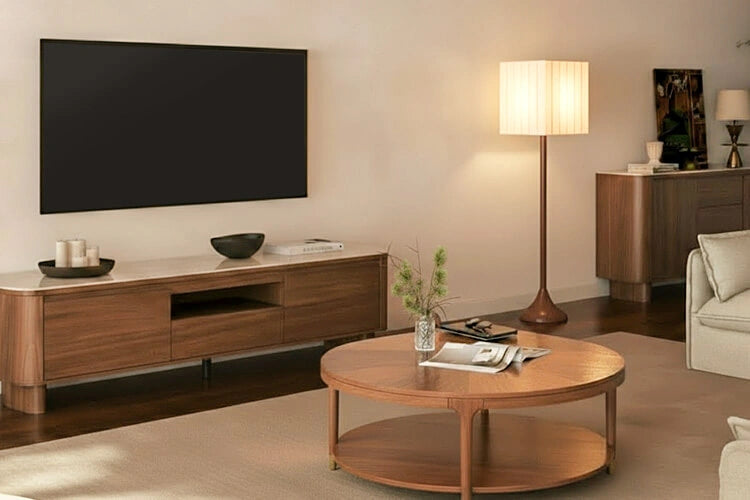
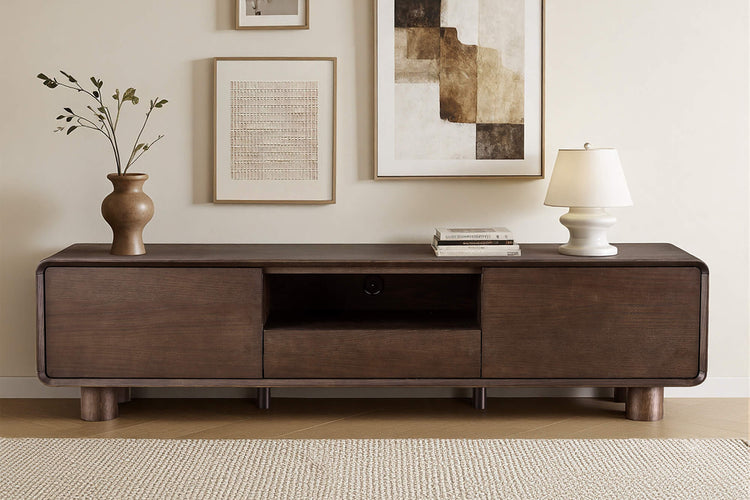
The Irais TV stand, listed as 79" Irais Oak TV Stand with Sintered Stone, measures 79.53 inches wide by 19.69 inches deep by 21.06 inches high and has cabinets, drawers, cord cutouts, and minimal leg assembly. The product facts do not provide the internal opening geometry or ventilation provisions needed to approve an enclosed electronics layout.
At the cart stage, ask the seller or manufacturer for any missing compatibility-critical details: usable compartment dimensions, rear openings, ventilation provisions, shelf-specific load guidance, cable and connector clearance, and service access. Add a unit only when those details match your equipment map and device guidance.
Frequently Asked Questions
The answers below address remaining purchase questions about furniture construction and listed features.
Does fully assembled mean electronics can go in immediately?
No. It describes the furniture’s construction status, not the placement, fit, airflow, load, stability, or access conditions for your equipment. The delivered unit still needs the installation inspection described above.
Do adjustable shelves prove that a NAS or mini PC will fit?
No. Adjustable shelves can change shelf position, but a listing that names adjustable shelves does not by itself provide the usable compartment openings, airflow provisions, or device clearances required for an electronics layout.
Does a rear cable port prove adequate cable clearance?
No. A port may provide an entry or exit point, but it does not establish connector bend room, unobstructed vents, outlet access, or service access for the complete setup.
For an electronics setup, fit and operating conditions matter more than assembly convenience. Compare the equipment map with the unit’s documented openings, clearances, load guidance, and service access before ordering.
Recommended Products
More to Read
 7 Sofa Trends That Actually Improve Comfort in 2026
Upgrade your living room with furniture that supports your body. Here are 7 modern sofa features designed to maximize your daily comfort...
7 Sofa Trends That Actually Improve Comfort in 2026
Upgrade your living room with furniture that supports your body. Here are 7 modern sofa features designed to maximize your daily comfort...
 Mother's Day Gift Guide: Cozy and Stylish Furniture Picks for Modern Moms
Make Mother's Day more meaningful with furniture gifts that bring comfort, smart features, storage, and quiet luxury into her everyday routine.
Mother's Day Gift Guide: Cozy and Stylish Furniture Picks for Modern Moms
Make Mother's Day more meaningful with furniture gifts that bring comfort, smart features, storage, and quiet luxury into her everyday routine.
 Performance Fabric Reality Check: Does It Really Repel Pet Hair and Stains?
Performance fabric is often marketed as a miracle solution for homes with pets and kids, but the reality is more nuanced. It...
Performance Fabric Reality Check: Does It Really Repel Pet Hair and Stains?
Performance fabric is often marketed as a miracle solution for homes with pets and kids, but the reality is more nuanced. It...