




















2026 Media Storage Furniture Trends for gaming setups

The most useful 2026 furniture trends for gaming setups are not about one specific look. They favor media storage that blends into a living room while giving your equipment enough space, easy access, organized cable routes, and device-specific ventilation checks. Choose modular storage if your setup may change, cable-conscious storage when visible wires are the main problem, accessible storage when you need to reach, clean, or service equipment often, and design-forward proportions when the room's appearance comes first. Any enclosed option also requires a device-specific ventilation check.

Choose the 2026 Furniture Trend Direction That Fits Your Setup
Treat these furniture trends as directional design options, not universal or independently verified standards. The right choice solves your room's biggest frustration without creating a new equipment problem.
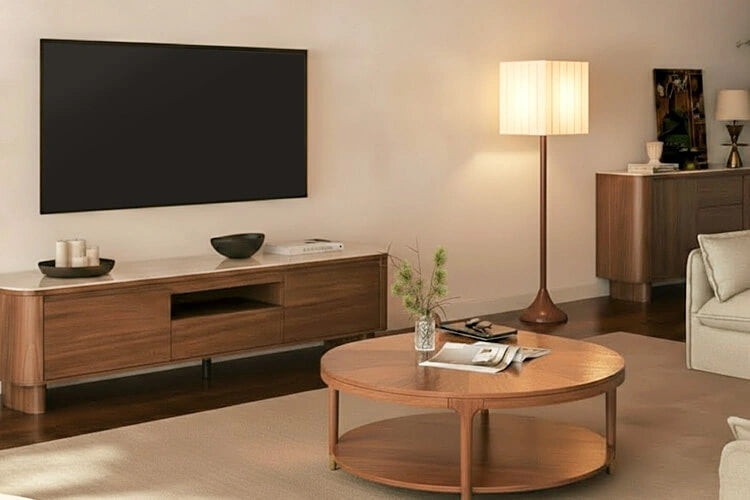
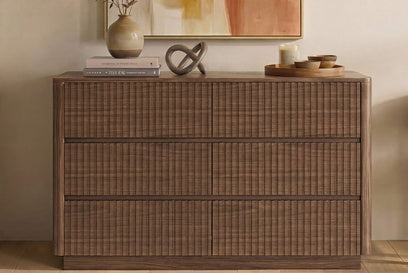
- Integrated, design-forward media storage: This works well in a shared living room where the setup should look appropriate even when you're not gaming. Start by checking the console's width, the furniture's usable depth, and the display's proportions relative to the piece. Textured or fluted fronts, softer silhouettes, rounded forms, warm finishes, and visually lighter shapes can support the room's style, but they do not establish equipment compatibility. The tradeoff is that a polished exterior can limit access or complicate cable routing.
- Modular media storage: Choose this direction when your equipment, accessories, or room layout may change. First check whether the current shelves, compartments, openings, and usable dimensions fit your setup. Then consider how a future rearrangement would work. Modularity can add flexibility, but the label alone does not guarantee useful reconfiguration.
- Cable-conscious storage: This is the better starting point when visible wires are the main source of clutter. Map the route from the display and devices to power before choosing a piece, then compare that route with the location of the cable openings. A cleaner front view may require more planning behind the furniture, and a cable hole alone does not guarantee that every route will work.
- Accessible equipment storage: Favor this direction when you frequently reach for controllers, docks, discs, accessories, or devices, or when equipment needs to come out for cleaning or changes. Check door and drawer movement, hand access, and cable slack. Open or easy-access storage is convenient, but it leaves more equipment and visual clutter on display.
- Enclosed-storage fit gate: This is not a style trend. Apply it whenever a console, PC, streaming device, or other equipment may sit inside an enclosed compartment. Compare the device manufacturer's placement guidance with the shelf, rear, and side clearances of the actual furniture. A grille, open back, or cabinet description does not prove that the placement is suitable, so unresolved ventilation details should remove a candidate from the verified shortlist.
Balance Home Aesthetics Against Gaming Equipment Demands
Start with the problem that's already making the setup difficult, then use style as the second filter. If visible clutter is the issue, concealed storage can improve the room's appearance, but doors and drawers may make remote use, cleaning, cable routing, or equipment removal less convenient when you use the equipment often. Choose the storage pattern that makes your most frequent task easy enough.
Open storage keeps equipment easy to see and reach, but it also leaves more of the setup on display. Closed storage creates a calmer visual field, yet it requires closer checks for access, cable paths, and device placement. For a high-spec setup with multiple devices or power bricks, prioritize the actual route and usable space before choosing a front treatment. In a shared room, compare furniture scale, finish, and visual weight only after those functional checks pass.

Modularity is valuable when you can name the likely change: adding equipment, changing accessories, or moving the console to another wall. It is less useful as a decorative promise. Current shelves and openings still need to fit the equipment you own today. Likewise, fluted fronts, rounded edges, warm finishes, and concealed storage belong in the appearance category. They may help a gaming setup blend into the room, but they do not establish shelf depth, airflow, cable routing, load capacity, or device compatibility.
For a value-conscious upgrade, solve the biggest practical constraint first: clutter, access, cable routing, capacity, room fit, or ventilation. Then compare styling features and prices among the candidates that pass.
Verify Dimensions, Cable Paths, Access, and Ventilation Before Buying
Use this sequence for every candidate. Mark each result pass, fail, or unresolved rather than treating an attractive exterior as proof of fit.
- Pass, fail, or unresolved: measure the complete equipment footprint. Record the width, depth, and height of each console, PC, speaker, dock, power brick, and stand. Include space for cable bends, door or drawer movement, and equipment removal. Compare those measurements with the candidate's listed exterior dimensions and usable interior space. Exterior width alone cannot establish interior fit.
- Pass, fail, or unresolved: trace every cable and power route. Draw the path between the display, consoles, PC or streaming equipment, speakers, outlets, and power. Note which side or rear opening each cable needs, how much practical slack is required, and whether a door or drawer will interfere. If the product page does not show the opening location, or the route cannot be made without pinching or sharply restricting a cable, leave the result unresolved.
- Pass, fail, or unresolved: compare enclosed placement with device guidance. Read the current placement or ventilation instructions for each device intended for an enclosed compartment. Compare that guidance with the furniture's actual shelf, rear, and side conditions. Do not infer adequate airflow from a grille, open back, cable hole, or general "media storage" label. If the device guidance or furniture clearances are unavailable, do not call the candidate verified.
- Pass, fail, or unresolved: test daily access. Confirm that you can reach controllers and frequently used accessories, use remotes, clean around the equipment, and remove devices without dismantling the entire arrangement. Check the swing or slide of every door and drawer against nearby walls, seating, and cables. A candidate that fits on paper but blocks routine access fails the practical fit test.
- Pass, fail, or unresolved: review the current individual product details. Compare listed dimensions, shelf information, load information where provided, assembly requirements, delivery terms, returns, and warranty before adding the piece to your cart. Product descriptions do not automatically answer questions about usable interior dimensions, cable-route suitability, or device compatibility, so keep any missing detail unresolved.
- Pass, fail, or unresolved: tape the footprint in the room. Use painter's tape to mark the proposed width and depth. Stand where viewers will sit and check sightlines, walking clearance, outlet reach, cable direction, and the furniture's proportions against the wall and display. This final in-room test can eliminate a candidate that passed equipment measurements but overwhelms the shared space.
Turn the Measurements Into a Focused Furniture Shortlist
Use the measurements to turn these furniture trends into a shortlist. Create one record for each candidate that passes the fit gates. Note the room position, display width, complete equipment footprint, usable storage, cable-entry location, access pattern, ventilation status, finish needs, and any unresolved product detail. Eliminate a candidate that fails equipment, cable, access, or ventilation checks before comparing finish, proportion, or price.
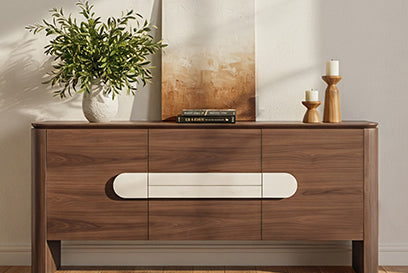
As contextual browsing starting points, compare the 62-inch Clara sideboard when a discreet sideboard format with doors, drawers, adjustable shelves, and concealed cable-management holes matches the design brief.
Consider the 79-inch Coral TV stand when a wider fluted TV stand with four cabinet sections and adjustable shelves fits the room and storage needs. Consider the 79-inch Vanessa console when a 79-inch console with three drawers and stated media-device and gaming-accessory storage matches your organization needs. These are descriptive starting points, not a ranking.
For every product, leave actual openings, usable dimensions, cable paths, access, and device-specific placement conditions unresolved until current individual product details and equipment guidance establish them.
Your next action is simple: measure the equipment, tape the proposed furniture footprint, and keep only candidates marked pass on the fit gates. Compare the remaining pieces for finish, proportion, and price, then open the individual product pages for any details that remain unresolved.
Frequently Asked Questions
Use these questions to resolve common setup decisions after recording the fit details.
How Do I Hide Gaming Cables in a Media Console Without Losing Access?
Sketch each route from the display and devices to power before choosing the furniture. Select openings that align with those routes and leave practical slack for changes, while keeping frequently used controllers, discs, and devices reachable instead of hiding them solely for appearance.
Can Gaming Consoles Go Inside a Closed Media Cabinet?
There is no universal yes-or-no answer. Compare the specific device's placement instructions with the compartment's actual clearances, cable path, and access pattern. If those details cannot be verified, keep open or more accessible storage on the shortlist rather than calling the enclosed option verified.
When Is Modular Media Storage Worth Choosing for a Gaming Setup?
It is most useful when equipment, accessories, or room placement may change. Use a concrete trigger, such as adding equipment or moving rooms, and confirm that the current shelves, compartments, dimensions, and cable openings already fit today's setup before paying for flexibility.
How Can I Make a Gaming Setup Blend Into a Living Room?
Start with furniture scale, finish, visual weight, and practical concealment that suit the room. Then treat appearance as a separate decision from equipment fit, cable routing, daily access, and device-specific ventilation.
Recommended Products

More to Read
 7 Sofa Trends That Actually Improve Comfort in 2026
Upgrade your living room with furniture that supports your body. Here are 7 modern sofa features designed to maximize your daily comfort...
7 Sofa Trends That Actually Improve Comfort in 2026
Upgrade your living room with furniture that supports your body. Here are 7 modern sofa features designed to maximize your daily comfort...
 Mother's Day Gift Guide: Cozy and Stylish Furniture Picks for Modern Moms
Make Mother's Day more meaningful with furniture gifts that bring comfort, smart features, storage, and quiet luxury into her everyday routine.
Mother's Day Gift Guide: Cozy and Stylish Furniture Picks for Modern Moms
Make Mother's Day more meaningful with furniture gifts that bring comfort, smart features, storage, and quiet luxury into her everyday routine.
 Performance Fabric Reality Check: Does It Really Repel Pet Hair and Stains?
Performance fabric is often marketed as a miracle solution for homes with pets and kids, but the reality is more nuanced. It...
Performance Fabric Reality Check: Does It Really Repel Pet Hair and Stains?
Performance fabric is often marketed as a miracle solution for homes with pets and kids, but the reality is more nuanced. It...