




























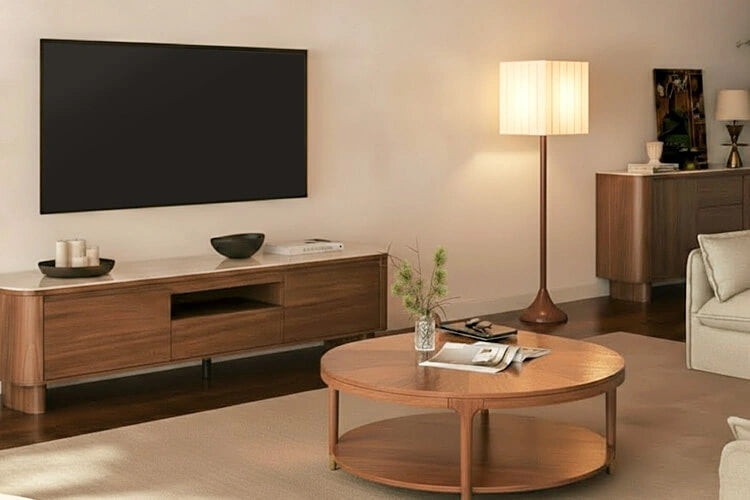


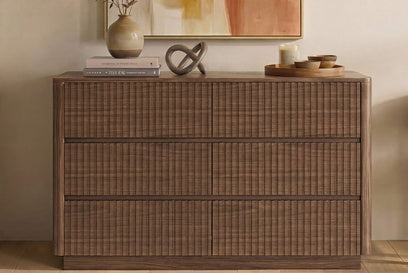










The safest, cleanest tv stand setup starts before you buy or move a single piece of furniture. Map your devices, cable routes, outlet locations, ventilation needs, and likely future gadgets first, then match the furniture to that plan. Skipping this step is why cable clutter and blocked vents show up so often in living rooms packed with a TV, streaming box, game console, and soundbar.

The mistakes below cover the moments where style choices quietly conflict with airflow, access, and safety. Each one comes with a direct fix you can apply whether you're shopping for a new tv stand or fixing the one you already own.
The first mistake: buying or arranging a TV stand before mapping the setup
Most cord-management problems start with furniture chosen for looks before anyone checked how the devices actually connect. Map five things first: every device you own, where each cable needs to travel, where your outlets sit, which parts need airflow, and what you're likely to add later.

- Devices: TV, streaming box, game console, soundbar, router, and any lighting or accessories
- Routes: which cable runs to the outlet and which runs between devices
- Outlets: location relative to where the furniture will sit
- Ventilation: which components generate heat and need open space
- Future connections: gear you're likely to add within the next year or two
Once you have that list, the decision is simple. Keep the current arrangement if every plug and vent stays reachable and clear. Adjust it if one route is blocked but fixable. Replace the furniture or the layout if a basic setup with one TV and one streaming box, or a tech-heavy rig with several consoles and audio components, can't satisfy all five points at once.
Mistake 1: Hiding every device in a closed compartment
A closed cabinet door looks tidy, but it's a poor fit for electronics whenever it blocks the vents those devices need to release heat. Check the device's vents, the furniture's openings, and the manual's placement instructions before you close anything.
Start with the device itself. Look for slotted vents on the back, sides, or top of the TV, streaming box, or game console, since these openings are how the unit disperses heat. Next, compare those vent locations to the furniture's actual rear and side openings; a compartment with no gap behind it can trap heat even if the front looks fine. Manufacturer guidance for applicable Sony televisions calls for the rear ventilation opening to stay clear, with roughly 2 to 6 inches of clearance behind the set and about 4 inches at the sides, though the specific number always depends on the model, so the device manual is the deciding document, not this general guidance.
If a device shows overheating symptoms, like an unusually hot casing or unexpected shutdowns, or its required ventilation openings are blocked by the compartment, stop using that enclosed arrangement. Move the device to an open shelf or a compartment with a confirmed rear opening instead.
Mistake 2: Ignoring outlet access and cable reach
A route plan fails when it hides a cable instead of making it reachable. Before you place the tv stand, sketch each device's cable direction separately for signal cables (HDMI, optical) and power cables, since they often need different paths to the same general area.
Keep your outlet and any connection you're likely to change reachable through an existing rear opening or accessible compartment door. Hidden length is fine; inaccessible length is not. A cable tucked neatly behind a solid back panel with no opening becomes a problem the moment you need to swap a streaming device or move the router.
- Confirm the outlet location before finalizing furniture position
- Route signal and power cables separately when possible
- Leave a front or rear access point for the connections you'll touch most often
- Keep a small amount of slack rather than pulling cables tight across doors or vents
Mistake 3: Treating power strips and excess cable as decor
Hiding a power strip behind furniture doesn't make it safe; only its electrical rating and connected load do that. Check the strip's watt or amp rating against what you're plugging into it before you decide where it goes.
Outlet count is not a safe loading limit. According to UL Solutions' guidance on power strips, an eight-outlet strip doesn't mean eight devices are automatically safe to run; what matters is whether the combined draw of your TV, console, soundbar, and streaming box stays under the strip's rated capacity. Inspect the strip and its cord for cracks, fraying, or heat discoloration before tucking it behind the console, and swap out anything damaged.
According to CPSC extension-cord guidance, extension cords should be limited to situations where they are genuinely necessary, with the cord's rating matched to the load, the three-prong connection kept intact, and cords never run under rugs or carpets, since covered cords trap heat that the covering was never designed to release. Route excess cable through an accessible opening in the furniture instead, where it can be seen and inspected.
Mistake 4: Drilling or routing without checking the furniture and wall
A new cable opening is a decision point, not a weekend project to improvise. Before drilling anything, check three things: the furniture's existing rear openings, the manufacturer's assembly instructions, and the wall and outlet layout behind the piece.
Favor the cable holes and access panels the furniture already includes over cutting anything new. If your current routing genuinely requires a new opening in the furniture or wall, and you can't verify from the instructions or a look behind the wall that it's safe and reversible, stop and get help from a qualified installer rather than guessing at a structural or electrical change.
Mistake 5: Planning only for today's devices
A console that fits your current TV and one streaming box perfectly can become the reason a new gaming setup or soundbar creates a fresh tangle of visible cable a year later. Reserve one spare route or accessible connection point now instead of filling every shelf and permanently bundling every cable.
For a basic setup, one open shelf slot and a little slack near the outlet covers most near-term additions. For a tech-heavy living room already running multiple consoles and audio components, prioritize adjustable shelving that can shift when component sizes change, and keep at least one cable path uncommitted. For a household expecting a specific upgrade soon, like a new soundbar or a larger TV, confirm that the furniture's storage is adjustable rather than fixed, since dimensions and ventilation still need their own separate check when the new device arrives.
When TV stand features genuinely improve cord management
A rear cable hole or an adjustable shelf can solve a specific routing problem, but it doesn't guarantee ventilation or fit for every device you own. We built our tv stand lineup with that distinction in mind, so here's where each one actually helps.
| Product | Verified cord-management feature | Best-fit use and limit |
|---|---|---|
| Bennett 62-inch TV stand | Two rear cable holes, adjustable interior shelves, supports TVs up to 70 inches | Best when you need defined rear routing points for a compact setup; verify your device dimensions and vent needs separately |
| 79-inch Glenn media console | Rear cable port, 19-inch depth, three-level adjustable shelves, four cabinets | Best for a deeper, tech-heavy setup with several components that need adjustable storage plus one routed cable path |
| Vanessa extendable console | Extends from 79 to 110 inches, three drawers | Best when width flexibility for a changing room layout matters most; supplied specs don't confirm a dedicated cable port, so check cable and ventilation fit on your own before buying |
If your main problem is a tangle of visible cable behind a single console, Bennett's or Glenn's rear routing points are the more direct fix. If your main problem is a room layout that keeps changing, Vanessa's width range solves that specific issue, but you'll still want to measure your device vents and cable reach against it before adding it to your cart. Either way, engineered comfort means the furniture should serve the routing plan you already made, not replace it.
FAQs
Can I put a streaming box or game console in a closed TV stand?
Only if the device's vents stay unobstructed once the door is closed and the manual doesn't warn against enclosed placement. If the compartment lacks a rear opening or the manual calls for open airflow, keep that device on an open shelf instead.
How many devices can one power strip support?
Outlet count doesn't set the limit; the strip's watt or amp rating compared against your combined equipment does. Add up what you're plugging into it and check that total against the rating printed on the strip before deciding how much to connect.
How can I hide cords without putting them under a rug?
Route excess cable through the furniture's existing rear opening or an accessible compartment instead of under flooring. The CPSC's guidance on extension cords also applies to keeping cords out from under rugs, since a covered cord can't release heat the way an exposed one can.
What should I leave room for when I upgrade my setup?
Reserve one spare cable path and one easily reachable connection point rather than filling every shelf now. Flexible or adjustable storage helps you absorb a new console, soundbar, or larger TV later without rebuilding your entire routing plan.
Sources
- Sony. Television ventilation spacing guidance.
- UL Solutions. Power strips and surge protectors.
- U.S. Consumer Product Safety Commission. Extension cord fire safety guidance.
Recommended Products


More to Read
 7 Sofa Trends That Actually Improve Comfort in 2026
Upgrade your living room with furniture that supports your body. Here are 7 modern sofa features designed to maximize your daily comfort...
7 Sofa Trends That Actually Improve Comfort in 2026
Upgrade your living room with furniture that supports your body. Here are 7 modern sofa features designed to maximize your daily comfort...
 Mother's Day Gift Guide: Cozy and Stylish Furniture Picks for Modern Moms
Make Mother's Day more meaningful with furniture gifts that bring comfort, smart features, storage, and quiet luxury into her everyday routine.
Mother's Day Gift Guide: Cozy and Stylish Furniture Picks for Modern Moms
Make Mother's Day more meaningful with furniture gifts that bring comfort, smart features, storage, and quiet luxury into her everyday routine.
 Performance Fabric Reality Check: Does It Really Repel Pet Hair and Stains?
Performance fabric is often marketed as a miracle solution for homes with pets and kids, but the reality is more nuanced. It...
Performance Fabric Reality Check: Does It Really Repel Pet Hair and Stains?
Performance fabric is often marketed as a miracle solution for homes with pets and kids, but the reality is more nuanced. It...