
























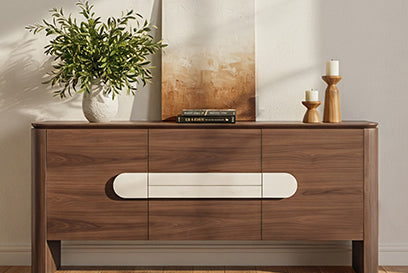









Start by measuring your TV's actual width, depth, and feet span, then match that footprint to your room's seating distance, walkways, and any competing focal point like a window or fireplace. From there, pick one of four starting layouts: a low console for flexible, no-mount rooms; a wall mount with storage below for a clean sightline; a wider or extendable console to zone an open floor plan; or an adjusted, offset arrangement for a compact or visually busy room.

Once you know which scenario fits, the right media storage furniture becomes obvious. A 75-inch screen is a big visual object, and the console or cabinet beneath or beside it either grounds that scale or fights it.
Choose the Right Layout for Your 75-Inch TV
The room's biggest constraint, not the TV size alone, decides your starting layout. Use the table below to match your situation to a layout and the storage role it needs to play.
| Room condition | Best starting layout | Media-storage role |
|---|---|---|
| No wall mounting, want flexibility | Console-mounted | Low, wide anchor plus concealed storage |
| Want a clean sightline, floor space matters | Wall-mounted | Storage base below screen, cable routing |
| Open floor plan needing a defined zone | Open-plan/modular | Wider or extendable footprint for zoning |
| Small room or a window/fireplace nearby | Compact/offset | Shallow footprint, function over symmetry |
Remember that "75-inch" describes the screen's diagonal measurement, not the TV's actual width or the stand you need. Two 75-inch TVs from different brands can have noticeably different overall widths, foot spacing, and weight, so pull out the manufacturer's spec sheet before you shop for furniture. Also record your room's dimensions, the distance from the primary seat to the wall, any walkways or doors near the TV wall, and whether delivery trucks or movers can get a large piece of furniture through your entry. These numbers, not a decorating checklist, are what actually narrow down your options in the sections below.
Console-Mounted Layout: Build Around a Low, Wide Stand
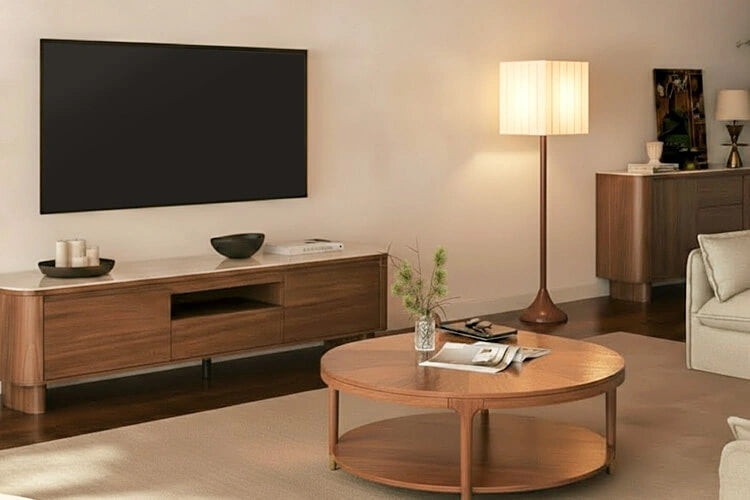
A console-mounted layout works best when you want flexibility, do not want to mount into drywall or studs, or you are renting and may move again. A low, broad stand visually balances a 75-inch screen because it gives the TV a wide base to sit on rather than looking perched on a narrow piece of furniture.
Before buying, compare your TV's foot span, depth, and total weight against the console's documented support. According to CPSC TV safety guidance, televisions should only be placed on furniture designed to hold a TV, and even TVs that are not wall mounted should still be anchored, with top-heavy furniture secured using anti-tip brackets and manufacturer instructions followed closely. That single check determines whether a console-mounted setup is workable at all, so confirm it before finalizing the layout.
For a bounded example, the 79-inch Vanessa console measures 78.74 inches wide, 15.75 inches deep, and 12.2 inches high, with three solid pine drawers and a 250-pound weight capacity. Its low, wide profile suits a console-mounted layout, and the concealed drawers give you a place to store media devices and remotes without cluttering the surface. It arrives fully assembled, which is useful if you want the layout finished the same day it's delivered. Confirm your specific TV's footprint and weight against these numbers before treating it as a match.
Wall-Mounted Layout: Keep Storage Below the Screen
A wall-mounted 75-inch TV works well when you want a clean sightline and need the floor space a console would otherwise use. In this layout, the storage unit below the screen becomes the visual base of the whole TV wall, so its height and depth matter more than in a console-mounted setup.
Before committing to wall mounting, confirm your wall construction, the mount's weight rating, and the TV manufacturer's mounting instructions all line up, since these are setup-specific and vary by home and TV model. Once that's settled, test the furniture's height and depth against your seated sightline rather than assuming a fixed number will work in every room, and plan your cable routing before you push the unit into place.
The Riley media console is documented at 78.74 inches wide, 18.90 inches deep, and 19.69 inches high, with three-level adjustable shelves, cabinets and drawers, and a rear cable port for routing cords to nearby devices. Its 220-pound capacity and enclosed storage suit a wall-mounted layout where you want components organized and out of view rather than stacked on open shelves. Check the unit's height against your seating position before ordering, since a taller cabinet can crowd the view for a low, wall-mounted screen.
Open-Plan Layout: Use Media Storage to Define the Seating Zone
In an open floor plan, media storage furniture can define the seating zone instead of just holding the TV. A wider or extendable footprint anchors the space so the TV area reads as its own zone rather than getting lost in a larger open room.
The tradeoff runs both directions. A narrow, fixed-width stand can disappear visually in a large room and leave the seating area feeling unanchored, while a permanently oversized piece can restrict circulation or make future rearranging harder. An extendable console lets you adjust the footprint as your layout changes, which is useful if you expect to reconfigure the room or upgrade the TV later.
The extendable Vanessa console adjusts from 78.74 inches to 110.24 inches wide, with a 15.75-inch depth and 14.17-inch height, and the listing states compatibility with 65-inch to 100-inch TVs. That range gives you room to grow the footprint as the zone needs it, but the listed compatibility is a starting point, not a substitute for measuring your specific TV against the extended and unextended widths. Base the decision on how much circulation space the extension leaves around it, not on TV size alone.

Compact Rooms and Competing Focal Points
When the room is small or another feature competes for attention, the priority shifts from filling the wall to protecting the space you actually use. Two adjustments cover most of these situations.
In a compact room, choose a shallower console so it doesn't eat into your walkway, and pick storage that earns its footprint rather than adding depth for looks alone. Confirming delivery access matters more here too, since a large piece can be hard to maneuver into a tight apartment; our small apartment TV stand guide covers measuring for narrow entries and limited floor space in more detail.
When a window, doorway, or fireplace already anchors the room, resist centering the TV purely for symmetry. An offset or adjacent placement that preserves the walkway and keeps the fireplace or window usable is often the more livable choice, even if it means the console sits slightly off-center. Function should outrank a perfectly centered look when the room's existing focal point still needs to work.
Measure, Verify, and Make the Final Fit Decision
Before you buy furniture or mount the TV, run through this sequence and treat any failed step as a reason to revise the layout rather than proceed.
- Measure your TV's actual width, height, depth, feet or mount pattern, and weight, and write them down.
- Compare those numbers against the selected furniture's documented width, depth, height, and weight capacity.
- Sit in your usual seat and check that the screen height and distance feel comfortable; adjust the furniture height or placement if the sightline feels off.
- Confirm circulation: walkways, doors, and any nearby focal point still function with the furniture in place.
- For wall mounting, confirm the wall type, mount rating, and TV manufacturer instructions all match, and plan the cable route.
- Confirm delivery access into the room, then proceed to the console or configuration that passed every check above.
If every step passes, you can move forward with the console, wall-mounted storage, or extendable configuration you selected earlier. If any step fails, adjust the scenario or furniture choice before ordering rather than working around it after delivery.
FAQs
Does a 75-inch TV need a 75-inch-wide TV stand?
No. The 75-inch measurement describes the screen's diagonal size, not the TV's actual width or the width of furniture it needs. Check the TV manufacturer's listed width, foot span or mount pattern, depth, and weight, then compare those figures to the furniture's documented support rather than choosing a stand based on the diagonal number alone.
What should I confirm before mounting a 75-inch TV above media storage?
Confirm the TV and mount manufacturer's instructions, the wall's construction and mount weight rating, and the furniture's documented capacity if anything rests below the screen. Plan your cable route before final placement, and check the seated sightline once the furniture is in position. These checks are setup-specific, so don't substitute a general rule for the current instructions.
How do you safely anchor a 75-inch TV on a media console?
Televisions placed on consoles should always sit on furniture designed to support TVs and be secured according to manufacturer instructions. Follow the provided setup guidelines, use anti-tip wall brackets for the furniture, and anchor the screen to prevent accidental tip-overs even when the TV is not wall-mounted.
Recommended Products



More to Read
 7 Sofa Trends That Actually Improve Comfort in 2026
Upgrade your living room with furniture that supports your body. Here are 7 modern sofa features designed to maximize your daily comfort...
7 Sofa Trends That Actually Improve Comfort in 2026
Upgrade your living room with furniture that supports your body. Here are 7 modern sofa features designed to maximize your daily comfort...
 Mother's Day Gift Guide: Cozy and Stylish Furniture Picks for Modern Moms
Make Mother's Day more meaningful with furniture gifts that bring comfort, smart features, storage, and quiet luxury into her everyday routine.
Mother's Day Gift Guide: Cozy and Stylish Furniture Picks for Modern Moms
Make Mother's Day more meaningful with furniture gifts that bring comfort, smart features, storage, and quiet luxury into her everyday routine.
 Performance Fabric Reality Check: Does It Really Repel Pet Hair and Stains?
Performance fabric is often marketed as a miracle solution for homes with pets and kids, but the reality is more nuanced. It...
Performance Fabric Reality Check: Does It Really Repel Pet Hair and Stains?
Performance fabric is often marketed as a miracle solution for homes with pets and kids, but the reality is more nuanced. It...