






















Ergonomic Counter Stools for 2026: Posture Support for Kitchen Island Living

In 2026, kitchen islands have evolved from casual breakfast spots into multifunctional workstations for remote work, family meals, and social gatherings. This shift makes ergonomic counter stools essential for maintaining comfort during longer sits rather than relying on style alone. The right geometry—particularly lumbar placement, backrest angle, seat depth, and swivel behavior—helps reduce the common cycle of slouching, lower-back fatigue, and leg discomfort that many experience after 30–60 minutes at the island.

Choosing ergonomic counter stools means prioritizing features that support neutral posture over purely plush looks. For most hybrid workers and families, this starts with verifying seat-to-counter clearance, then evaluating lumbar contour, waterfall edges, and swivel stability. The sections below translate these features into practical checks you can use before buying.
Why Ergonomics Matter for 2026 Kitchen Living
Kitchen islands now serve as 'kitchen island offices' for 2–4 hours at a stretch, turning what used to be quick perches into extended-use surfaces. Poorly designed stools often create a 'Slouch Trap' where inadequate back support and improper height force forward leaning, shoulder tension, and eventual lower-back strain. Ergonomic seating addresses this by focusing on functional support rather than just visual appeal, making it a practical wellness consideration for remote workers, hybrid professionals, and busy families.
This matters more in 2026 as open-plan kitchens integrate work, dining, and conversation zones. Without proper support features, even attractive stools can become uncomfortable quickly, leading to frequent posture shifts or the decision to stand. The key is matching stool geometry to your dominant island activity instead of defaulting to the softest-looking option.
Seat Height and Counter Clearance: The 10-12 Inch Rule
Proper seat height forms the foundation of good posture at a kitchen island because it enables neutral elbow alignment and prevents the need to hunch forward. For standard 34–36 inch counters, 24–26 inch seat-height stools typically deliver the recommended 10–12 inch clearance between the seat top and the counter's underside, as noted in common counter-seating measurement guidance (What Is Counter Seating? Measurements & Stool Heights).
Always measure your specific counter, including any apron or overhang on the underside, before shopping. Missing this step often steals needed thigh room and forces slouching even on otherwise supportive stools. For renters or those with non-standard islands, this 10–12 inch gap serves as a non-negotiable starting filter—anything less usually disqualifies the stool for extended use regardless of other features.
If your island doubles as a workspace, test the setup by sitting with elbows at roughly 90 degrees; your shoulders should stay relaxed without elevation. This clearance check eliminates many otherwise attractive options early and avoids the common regret of stools that look perfect but force awkward positioning.
The Science of Posture Support: Lumbar and Backrest Geometry
Real lumbar support requires the padded contour to land roughly 6–10 inches above the seat surface to align with the natural curve of the lower spine, according to BIFMA/ANSI chair standards (Updated Chair Standards Overview (BIFMA/ANSI)). A backrest angled between 100 and 130 degrees further helps reduce lumbar disc pressure compared to a rigid 90-degree upright position, per Cornell University ergonomics research (Ergonomics of sitting: Cornell University Ergonomics Web).
These aren't decorative elements. A stool only offering flat vertical backing fails to engage the lumbar curve during longer sessions, while one with correctly placed contour provides passive support that encourages neutral spine alignment without constant effort. For mid-tier counter stools, treat the 6–10 inch lumbar zone and 100–130 degree recline band as practical comfort benchmarks rather than guarantees of clinical results.
The chart below visualizes these thresholds alongside scenario priorities to help you judge fit quickly.
Ergonomic Fit Thresholds by Use Scenario
Use the shaded comfort bands to judge whether lumbar support height and backrest angle sit inside the safer setup range, then compare how WFH and Social priorities shift the recommendation.
View chart data
| Category | Safer range | WFH priority | Social priority |
|---|---|---|---|
| Lumbar support height | 4 | 8 | 8 |
| Backrest angle | 24 | 115 | 105 |
Seat Depth and Pressure Distribution: The Waterfall Edge
Leg tingling or fatigue after sitting at the island often stems from popliteal compression—the pressure on nerves and blood vessels behind the knees. A waterfall edge, which curves gently downward at the front of the seat, helps maintain circulation by reducing this pressure, according to Cornell ergonomics guidance on chair selection (CUergo: Choosing an ergonomic chair).
Ideal seat depth leaves a 1–2 inch gap between the seat edge and the back of your knees when your back rests against the lumbar support. High-resilience foam that resists bottoming out further extends comfortable sitting time, especially important for the multi-hour sessions common in 2026 kitchen-island use. Soft, low-density foam may feel inviting initially but often compresses too quickly, turning a promising stool into one that encourages slouching within an hour.
When evaluating in-store or via return policies, sit for at least 10–15 minutes. If your thighs feel compressed or your lower legs go numb, the depth or edge profile likely needs adjustment. This check prevents the frequent regret of purchasing visually appealing stools that fail during real daily use.

Swivel Mechanisms and Dynamic Movement
Swivel stools reduce the need for awkward spinal twisting when turning to converse or reach items in tight kitchen layouts. By allowing smooth 360-degree trunk rotation, they support more natural movement, which many find helpful for maintaining comfort during social or mixed-use island time, as highlighted in general posture recommendations from Cornell ergonomics resources (General Problems and Recommendations: Body Posture).
The trade-off appears in stability. High-quality swivel mechanisms with weighted bases feel secure, but cheaper versions can introduce slight wobble that distracts during focused tasks like laptop work. For open-concept kitchens where conversation flows around the island, swivel capability often outweighs fixed stability. In contrast, dedicated workstations benefit more from fixed bases that provide planted support for typing or detailed tasks.
Test swivel smoothness and base stability together. A stool that rotates effortlessly yet returns to center without excessive play usually balances mobility and confidence better than one that feels either locked or loose.
Choosing Your Setup: WFH Workstation vs. Social Dining Hub
Your primary kitchen island activity should dictate ergonomic priorities rather than a one-size-fits-all approach. For WFH-first users who spend hours at the island as a temporary desk, fixed or stable swivel stools with firm lumbar support in the 6–10 inch zone and clear waterfall edges typically deliver better sustained comfort. These setups minimize the small geometry flaws that compound over long sessions and reduce shoulder tension from poor clearance.
Social-first or casual dining users benefit more from swivel mechanisms that enable easy conversation flow and lighter visual profiles that don't dominate the space. Here, slightly easier entry and exit can matter more than maximum firmness, provided the stool still meets basic lumbar and clearance benchmarks. Hybrid households often land in the middle, seeking task-style counter stools that combine smooth swivel with BIFMA-aligned support geometry.
A useful self-check: If most island time involves screens or focused work, treat fixed stability and precise lumbar placement as non-negotiable. If the space centers on meals and lingering talks, prioritize swivel range and overall mobility while still confirming the 10–12 inch clearance rule. This scenario split helps avoid buying a lounge-style stool for work or an overly rigid one for family gatherings.
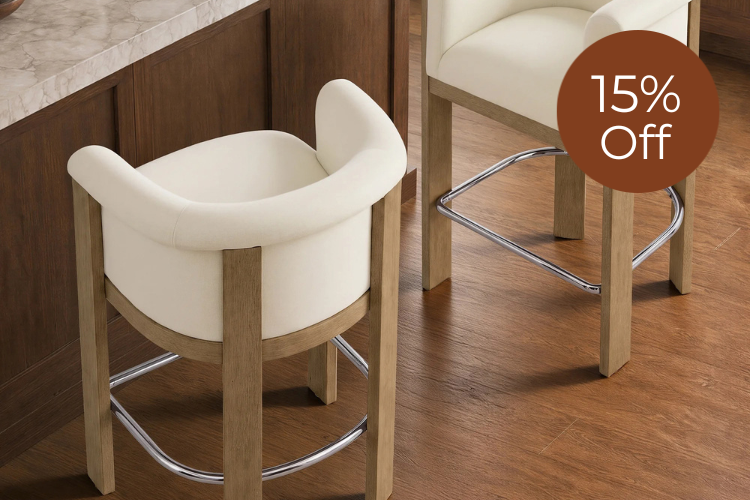
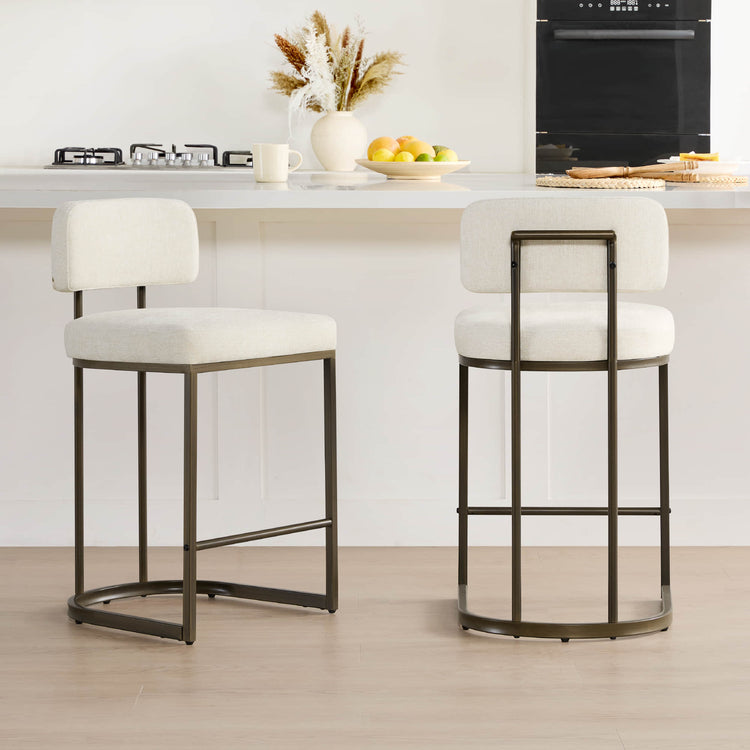
For practical examples, consider our Nova Swivel Bar & Counter Stool collection, which offers supportive backs and 360-degree rotation suitable for mixed use, or explore the broader Barstool & Counter Stool Latest range to compare options.
2026 Ergonomic Buying Checklist: Translating Features into Comfort
Translate ergonomic language into real comfort by using this shortlist before purchase. Start with the 10–12 inch clearance measurement between seat and counter underside, as this single check disqualifies many otherwise stylish options. Next, verify lumbar contact by sitting fully back—does the contour land in the 6–10 inch zone above the seat without a gap or pressure point?
Inspect the seat edge for a genuine waterfall profile and confirm at least a finger-width gap behind the knees. Press into the cushion to feel whether the foam returns quickly or bottoms out; high-resilience options generally hold shape better over time. Finally, test swivel action for smooth rotation without wobble, ensuring the base remains stable under normal movement.
Additional considerations include footrest height (ideally 15.5–17.5 inches below the seat for counter stools) to prevent dangling legs, and overall build quality for high-traffic family kitchens. Cross-reference these points against manufacturer specs and, when possible, in-person trials. For deeper reading on related topics, see our guides on Finding the Perfect Height: What is the Best Stool Height for Your Kitchen Counter? and Bar Stools vs Counter Stools: What's the Difference and Which One Do You Need?.
By focusing on these measurable geometry features rather than marketing claims about plushness, you increase the odds of selecting counter stools that remain comfortable for the long sessions typical of modern kitchen living.
Frequently Asked Questions
Do ergonomic counter stools actually reduce back pain? While many users report improved comfort during extended sitting, these stools provide support features rather than medical treatment. Results depend on individual posture habits, overall activity level, and whether the specific geometry matches your body. Consult a healthcare professional for persistent discomfort.
How important is swivel compared to fixed bases for kitchen islands? Swivel becomes more valuable in social or multi-user kitchens where turning to talk or share space is frequent, as it reduces spinal twisting. Fixed bases often feel more stable for dedicated laptop work or households with children climbing on and off. Hybrid use usually favors quality swivel with a weighted base.
What is the ideal seat depth for counter stools? Seat depth should allow your back to contact the lumbar support while leaving a 1–2 inch gap behind the knees. Depths around 16–18 inches work for many adults, but testing in your specific space is essential because counter overhang and personal leg length vary widely.
Can I use bar stools instead of counter stools at a kitchen island? Bar stools (typically 28–30 inches high) usually create too much clearance or force awkward reaching on standard 36-inch counters. Reserve them for true bar-height surfaces; counter stools maintain the 10–12 inch clearance needed for comfortable elbow and shoulder positioning.
How long should ergonomic counter stools last in daily family use? High-quality models with dense foam and robust mechanisms often remain supportive for 5–8 years under regular home use. Mid-tier options may compress noticeably sooner, especially if used for long daily sessions. Check warranties and foam density specifications when available.
What should I check first when shopping online for ergonomic stools? Begin with published seat height, lumbar placement measurements, and whether the product specifies a waterfall edge. Read recent customer reviews specifically mentioning comfort after one hour of sitting rather than initial impressions. Verify return policies given the restocking fees common with furniture.
Recommended Products

More to Read
 7 Sofa Trends That Actually Improve Comfort in 2026
Upgrade your living room with furniture that supports your body. Here are 7 modern sofa features designed to maximize your daily comfort...
7 Sofa Trends That Actually Improve Comfort in 2026
Upgrade your living room with furniture that supports your body. Here are 7 modern sofa features designed to maximize your daily comfort...
 Mother's Day Gift Guide: Cozy and Stylish Furniture Picks for Modern Moms
Make Mother's Day more meaningful with furniture gifts that bring comfort, smart features, storage, and quiet luxury into her everyday routine.
Mother's Day Gift Guide: Cozy and Stylish Furniture Picks for Modern Moms
Make Mother's Day more meaningful with furniture gifts that bring comfort, smart features, storage, and quiet luxury into her everyday routine.
 Performance Fabric Reality Check: Does It Really Repel Pet Hair and Stains?
Performance fabric is often marketed as a miracle solution for homes with pets and kids, but the reality is more nuanced. It...
Performance Fabric Reality Check: Does It Really Repel Pet Hair and Stains?
Performance fabric is often marketed as a miracle solution for homes with pets and kids, but the reality is more nuanced. It...