

























How to Choose a Media Console for a 75- or 85-Inch TV

A media console for a 75- or 85-inch TV needs to suit the way the screen is installed, the equipment you own and the view from your seat. Start with the TV's actual outside dimensions and base footprint. Then decide how much cabinet you want visible at each side and where the soundbar, receiver and cables will go.
Choose the installation first
For a TV resting on the console, the usable cabinet top must accommodate the complete feet or pedestal. Its stated top-load capacity must cover the television with its stand and every other item sharing that surface. Follow both products' installation and anti-tip instructions.
For a wall-mounted TV, choose the bracket and wall installation for the exact television. The console below supports the equipment placed on it. You can then judge its width by the room, the screen's visual proportion and the storage you need.
Write down the intended setup before comparing our TV stands and media consoles. A cabinet that works visually under a wall-mounted screen may need a separate support assessment for a tabletop television.

Pick the width you want to see beneath the screen
The advertised TV size measures the screen diagonally. A 16:9 screen is approximately 65.4 inches wide at a 75-inch diagonal and 74.1 inches wide at an 85-inch diagonal. Use the exact model's outside width, including its frame, when comparing a cabinet.
For appearance, try leaving 3–6 inches of cabinet visible on each side. This is an optional design allowance. Physical support is determined by the base footprint, cabinet rating and installation instructions.
| Example TV | Example outside width | Cabinet with 3 inches each side | Cabinet with 6 inches each side |
|---|---|---|---|
| 75-inch class | 66 inches | 72 inches | 78 inches |
| 85-inch class | 75 inches | 81 inches | 87 inches |
Cabinet width = actual TV width + the two side allowances. Substitute your model's width for the example. A 75-inch-wide television centered over an 80-inch cabinet leaves 2.5 inches visible at each side: (80 − 75) ÷ 2.
Mark the proposed cabinet ends on the wall or floor and check the view from the sofa. Include nearby shelving, a doorway and anything tall you plan to place beside the screen. A few inches of extra cabinet can change whether the wall looks crowded.
Give each device a usable space
TV feet and a soundbar on top
Measure the full front-to-back extent of the TV's feet. Check the flat, usable top rather than the cabinet's deepest point; curved corners or a raised edge can reduce the support area. Place the soundbar where it fits without covering the lower picture or remote-control receiver.
Record the soundbar's width, height and depth together with its cable connections. A paper outline on the cabinet top helps you see whether the soundbar and TV feet compete for the same space.
A receiver or game console inside
Measure the shelf opening and the usable internal depth. Include the space behind a plug or connector, and use each device's specified ventilation clearances. A cable opening provides a route for wires; the enclosure still needs the airflow required by the equipment.
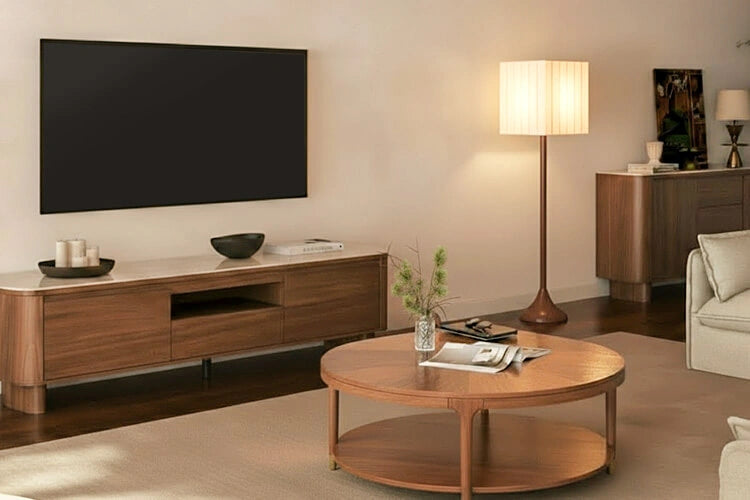
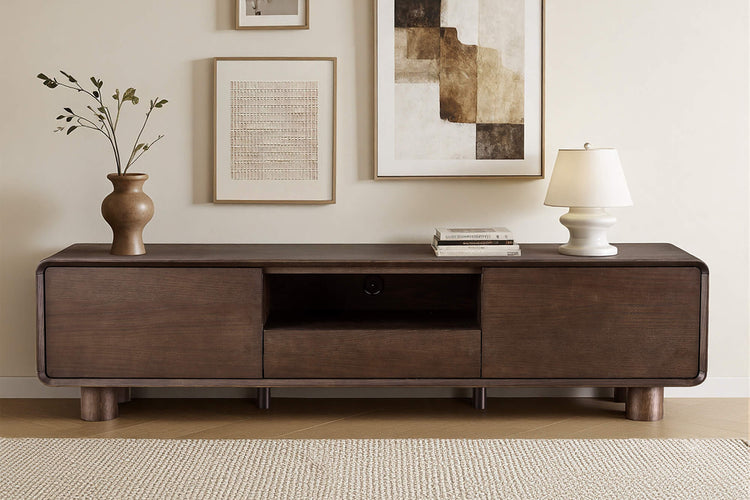
Our 71-inch Eason console combines an open shelf, doors and a drawer. Those different compartments can separate accessible equipment from stored accessories. Compare the dimensions of the compartment you intend to use with the actual device.

Set console height from your seat
Sit in the position you normally use for watching television and mark the screen-center height you find comfortable. Check it from other regular seats and from a reclined position if that is part of your setup.
For tabletop placement, subtract the TV's support-surface-to-screen-center distance from that target height. For example, a chosen center height of 42 inches and a distance of 22 inches from the bottom of the feet to the screen center give a 20-inch console. These are example measurements; use your TV and seated position.
For a wall-mounted screen, mark its bottom edge along with the cabinet top and soundbar. Our low-profile media console guide covers the visual effect of a lower cabinet and the space beneath the screen.
Check the support, then plan the room
For tabletop use, add the television's weight with its stand to the weight of the soundbar and any other objects on the cabinet top. Compare that total with the published top-load rating and permitted loading arrangement. Internal shelves have their own ratings.
If the rating or measurement for a CHITA cabinet is unclear, contact us with the cabinet name, TV model and planned equipment. Ask about the specific surface and load arrangement before choosing the pairing.
Follow the assembly instructions for center supports, leveling feet and anti-tip hardware. Mark the cabinet's full footprint on the floor, open its doors and nearby room doors, and check whether you can reach the outlets and equipment connections.
For a larger screen, our 98- and 100-inch TV stand guide covers the wider screen dimensions and support checks.

Media console questions
Can a 70- or 71-inch TV stand work with a 75-inch TV?
For a 75-inch TV with a 66-inch-wide body, a 70- or 71-inch console leaves 2–2.5 inches visible on each side. That can suit the appearance you want. For tabletop use, the TV's full base must fit the usable top, and the top-load rating must cover the TV, its stand and any accessories. Follow both products' installation requirements.
Is an 80-inch console wide enough for an 85-inch TV?
An 80-inch console leaves 2.5 inches of cabinet visible on each side of an 85-inch TV whose actual body is 75 inches wide. For a TV standing on the console, its full feet or pedestal must also fit the usable top, and the top-load rating must cover the TV with its stand and accessories. A wall-mounted TV is supported by its bracket and wall installation.
Does a TV console need to be wider than the television?
For a wall-mounted TV, no—the console can be narrower than the screen. For a TV resting on furniture, follow the TV and cabinet instructions for support: the full base must fit the usable top, and the cabinet's top-load rating must cover the TV, stand and accessories. Extra width at the sides is a visual choice.
How deep should the media console be?
For a TV standing on the console, measure its base from the frontmost to the rearmost contact point; the usable cabinet top needs to support that full depth. Allow a separate area for a soundbar if it sits in front. For equipment inside the console, add connector space and the device's specified ventilation clearance to its depth.
Recommended Products
More to Read
 7 Sofa Trends That Actually Improve Comfort in 2026
Upgrade your living room with furniture that supports your body. Here are 7 modern sofa features designed to maximize your daily comfort...
7 Sofa Trends That Actually Improve Comfort in 2026
Upgrade your living room with furniture that supports your body. Here are 7 modern sofa features designed to maximize your daily comfort...
 Mother's Day Gift Guide: Cozy and Stylish Furniture Picks for Modern Moms
Make Mother's Day more meaningful with furniture gifts that bring comfort, smart features, storage, and quiet luxury into her everyday routine.
Mother's Day Gift Guide: Cozy and Stylish Furniture Picks for Modern Moms
Make Mother's Day more meaningful with furniture gifts that bring comfort, smart features, storage, and quiet luxury into her everyday routine.
 Performance Fabric Reality Check: Does It Really Repel Pet Hair and Stains?
Performance fabric is often marketed as a miracle solution for homes with pets and kids, but the reality is more nuanced. It...
Performance Fabric Reality Check: Does It Really Repel Pet Hair and Stains?
Performance fabric is often marketed as a miracle solution for homes with pets and kids, but the reality is more nuanced. It...