
















































Recliners: USB-C charging vs Alternatives for back support

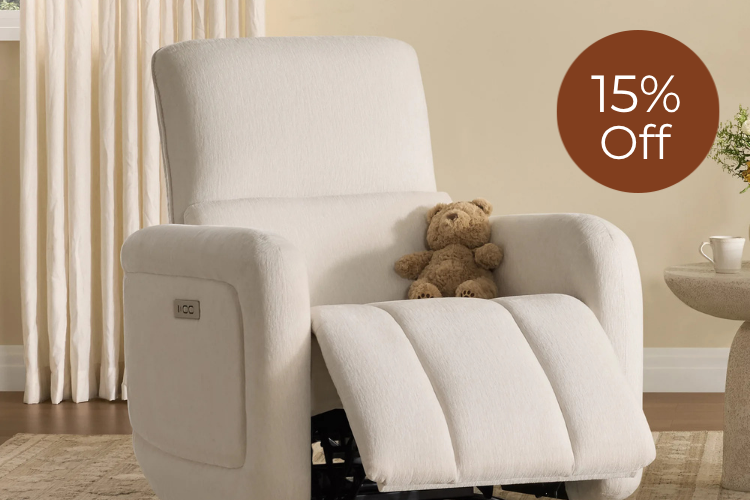
A recliner with USB-C charging should be judged on back support first, then convenience. USB-C is useful for daily charging, but it does not make a chair better for your posture, comfort, or fit. If you spend real time reading, watching TV, or lounging, the seat shape and recline feel matter more than the port.

Why Charging Should Not Replace Back Support
The simplest rule is this: buy the recliner for how it supports your body, not for the charging port. Mayo Clinic Store's guidance on recliner-style seating emphasizes lumbar shape and body fit first, which is the right order for a recliner with USB-C charging too. If the chair does not feel right when you sit back, a useful port is only a bonus.
That matters because people often notice the tech detail before they notice the seat geometry. USB-C can reduce cable clutter and make device charging easier, but it does not tell you whether the backrest matches your frame, whether the seat is too deep, or whether the chair still feels supportive after an hour.
A good decision sentence here is simple: if you want a chair for long TV sessions or reading, check support first; if you mainly want easier charging, then USB-C can move the chair higher on the list, but only after the seat passes the fit test.
For a broader comfort context, see how recliners fit into a comfortable living room, especially if you are comparing a seat for everyday use rather than occasional lounging.
What Actually Supports Your Back in a Recliner
For most shoppers, back support comes down to four checks: lumbar shape, seat depth, cushion firmness, and how the recline positions feel in your normal sitting posture. Support is not one feature. It is the combined feel of the backrest, seat, and adjustability working together.
Lumbar Shape and Backrest Feel
The lower back should feel held, not pushed into a strained position. Some recliners contour the backrest more deeply than others, and that changes whether the chair feels steady when you sit upright or only relaxed when fully reclined. If the lower back disappears into the cushion, the chair may feel softer than supportive.
Seat Depth, Cushion Firmness, and Edge Support
Seat depth should let you sit back without feeling stretched out. If the seat is too deep, shorter users often end up sliding forward, which changes the whole support feel. Cushion firmness matters too. A very soft seat can feel fine at first, but it may not stay comfortable for long sessions. The front edge should also feel smooth enough that your thighs do not take unnecessary pressure.
Power Headrests and Recline Positions
Adjustable headrests and multiple recline positions matter because long sitting comfort is not static. Low back pain clinical guidance notes that movement and changing positions matter, which is why a recliner that only works in one angle may be less useful for everyday lounging. In plain terms, the chair should let you shift from upright TV watching to a more relaxed angle without losing the feeling of support.
Body Fit and Everyday Use
A tall buyer and a shorter buyer can have very different reactions to the same recliner. That is why support should be judged in the positions you will actually use at home. If you mostly read, you may care more about head and neck position. If you mostly watch TV, the backrest and footrest relationship may matter more.
Find recliner styles that prioritize comfort fit if you want to compare seating features before you compare charging extras.
Decoding upholstery durability can also help if you want to compare cover options after you narrow down the fit.

USB-C Charging Versus Other Convenience Options
USB-C is best understood as a convenience upgrade, not a support upgrade. USB-IF notes that USB-C with Power Delivery can deliver higher power to compatible devices than USB-A, which is why it can be more useful for phones, tablets, and some larger devices. That is helpful if the chair sits near where you actually charge devices.
| Convenience Option | Typical Use Case | Pros | Limitations | Fits Best When |
|---|---|---|---|---|
| USB-C charging | Daily charging for modern devices | Reversible, more flexible for current devices, usually more future-friendly | Only useful if the port is placed well and compatible with your devices | You charge near the chair often and want less cable hassle |
| USB-A charging | Basic phone or accessory charging | Familiar and widely supported | Older style, less flexible for some newer devices | You mainly charge smaller, legacy-friendly devices |
| Wireless charging | Drop-and-go charging for supported phones | Very convenient for short top-ups | Device placement matters and not every device supports it | You want the easiest phone charging and do not mind slower positioning rules |
| No built-in charging | Use a nearby wall outlet or power strip | Simplest seat design, no port to think about | Less convenient for everyday use | Charging is not a meaningful part of your routine |
ViewSonic's USB-C overview is useful background because it shows why reversible connectors and modern charging standards feel easier in daily use, but the real shopping question is still whether the chair itself fits your body and room.
If you are comparing hidden power-recliner features, focus on whether the charging setup reduces friction in your routine rather than whether it sounds more advanced.
Where USB-C Makes the Most Sense
USB-C makes the most sense when the chair is part of your daily routine and you actually charge near it. That usually means:
- You watch TV or read in the chair for long stretches and keep a phone or tablet nearby.
- Outlet access is awkward, hidden, or already crowded.
- You want fewer cords crossing the room.
- You use newer devices often enough that a reversible charging port feels better than a legacy one.
A power recliner with USB-C is most useful when the charging port solves a real annoyance. If you already charge devices elsewhere, the port may be nice to have, but it should not drive the purchase.
The decision flip is easy to remember: if comfort is the main goal, evaluate the chair first and the port second; if clutter-free charging is a daily pain point, USB-C becomes more valuable, but only in a chair that already passes the support check.
How to Compare Recliner Support and Tech Before You Buy
Use this as a quick buying sequence for a recliner with USB-C charging:
- Sit in the chair and check whether the backrest feels steady in your normal posture.
- Test lumbar shape. The lower back should feel supported without forcing a rigid position.
- Check seat depth. Your body should settle back naturally without sliding forward.
- Try the recline positions. If the chair only feels good in one spot, that is a warning sign for long-session use.
- Check the headrest if the chair has one, especially if you watch TV or read often.
- Confirm where the charging port sits and whether it is easy to reach from your usual seat position.
- Match the port to the devices you use most. USB-C matters more if your household already uses USB-C charging a lot.
- Verify the return policy and warranty before you commit, because comfort is harder to judge from photos alone.
A good shortlist rule is this: choose support-first if the chair is for daily lounging, balance-first if you want both comfort and charging, and tech-first only when the charging feature solves a frequent problem and the seat still fits well.
If you are narrowing down specific models, compare a zero-gravity style sofa only after you have confirmed that the seating angle and back feel match your use case.
For another option, browse a charging recliner with a power headrest if you want to compare convenience features against the seat feel rather than assume they mean the same thing.
| Shopper Type | Back Support Fit | Charging Convenience | Room Clutter Reduction | Device Compatibility |
|---|---|---|---|---|
| Support-first shopper | High | Low | Low | Low |
| Balance-first shopper | High | Medium | Medium | Medium |
| Tech-first shopper | Medium | High | High | High |
Bottom-Line Fit Checklist
If you want the short version, buy the recliner for fit and support, then treat USB-C as a convenience upgrade. Check lumbar shape, seat depth, recline positions, and headrest feel before you let a charging port influence the decision. If you charge devices near the chair every day, USB-C is worth considering. If not, a well-fitting recliner without it may be the better buy.
FAQs
How Do I Know If a Recliner Has Enough Back Support for Daily Use?
Look for a backrest that feels steady in your normal sitting position, not just in the fully reclined position. Seat depth, lumbar shape, and cushion firmness should let you sit back without sliding forward or feeling pushed into an awkward posture. If possible, test the chair for several minutes, not just a quick sit-down.
What Is the Real Benefit of USB-C Charging in a Recliner?
The main benefit is convenience. USB-C is easier to plug in, more common on newer devices, and often more practical than legacy charging ports for everyday use. It helps with charging access, but it does not say anything about how the recliner supports your back.
Can a Recliner With Charging Still Be Comfortable for Long Sitting Sessions?
Yes, if the chair fits your body well. Long-session comfort depends more on seat depth, backrest contour, recline options, and headrest position than on whether the chair has a port. A recliner with charging can still be a strong comfort choice, but the feature itself does not create comfort.
What Should I Check Besides the Charging Port Before I Buy?
Check the recline controls, lumbar feel, seat firmness, and where the port sits relative to your usual seat position. Also confirm return terms and warranty coverage so you are not stuck with a chair that looks good online but feels wrong at home.
Is USB-C Better Than Wireless Charging for a Recliner?
It depends on your devices and how you sit. USB-C is usually better if you want a flexible, plug-in solution for phones, tablets, and other modern devices. Wireless charging can be simpler for quick top-ups, but only if your phone supports it and the placement works in your room.
Recommended Products



More to Read
 7 Sofa Trends That Actually Improve Comfort in 2026
Upgrade your living room with furniture that supports your body. Here are 7 modern sofa features designed to maximize your daily comfort...
7 Sofa Trends That Actually Improve Comfort in 2026
Upgrade your living room with furniture that supports your body. Here are 7 modern sofa features designed to maximize your daily comfort...
 Mother's Day Gift Guide: Cozy and Stylish Furniture Picks for Modern Moms
Make Mother's Day more meaningful with furniture gifts that bring comfort, smart features, storage, and quiet luxury into her everyday routine.
Mother's Day Gift Guide: Cozy and Stylish Furniture Picks for Modern Moms
Make Mother's Day more meaningful with furniture gifts that bring comfort, smart features, storage, and quiet luxury into her everyday routine.
 Performance Fabric Reality Check: Does It Really Repel Pet Hair and Stains?
Performance fabric is often marketed as a miracle solution for homes with pets and kids, but the reality is more nuanced. It...
Performance Fabric Reality Check: Does It Really Repel Pet Hair and Stains?
Performance fabric is often marketed as a miracle solution for homes with pets and kids, but the reality is more nuanced. It...