

















































In 2026, your recliner can become an active participant in your smart home ecosystem. Voice commands and app routines let you trigger zero-gravity positions, coordinate lighting and window treatments for movie nights, and monitor battery levels on cordless models without leaving the couch, provided you select Matter-compatible hardware and accept gradual, safety-limited motion speeds.

This integration removes repeated manual adjustments that once interrupted relaxation, but it also introduces new considerations around compatibility, battery management, setup friction, and realistic expectations for automation reliability.
The 2026 Smart Home Standard: Matter and Thread Interoperability
Matter 1.4 and 1.5 have become the dominant standard for smart furniture, allowing a single recliner to communicate seamlessly with Apple Home, Google Home, Amazon Alexa, and Samsung ecosystems without requiring separate manufacturer apps for each platform. Thread 1.4 serves as the low-power mesh networking backbone that keeps the recliner responsive even when other devices are offline.
For most households, this interoperability is the single biggest reason 2026 marks a practical tipping point. Earlier proprietary systems often forced users into ecosystem lock-in or multiple hubs. Matter reduces that friction, making it far more likely that your recliner can join an existing smart home scene alongside Lutron blinds or Philips Hue lights.
That said, not every recliner on the market fully implements the latest Matter version yet. Prioritize devices that advertise native Matter/Thread support over those that rely on bridges or firmware updates that may never arrive. This 2026 status review of the Matter standard explains why interoperability has improved significantly for battery-powered devices.
Many buyers also appreciate the cleaner aesthetic that comes with removing visible hubs and tangled cables. See our guide to The Stealth Tech Upgrade: Power Recliners with Hidden Wireless Charging for related hidden-tech approaches that complement smart integration.
Voice-Controlled Comfort: Alexa and Google Home Setup
Connecting a power recliner to voice assistants follows a repeatable three-step process that typically takes less than ten minutes. First link the manufacturer’s companion app to your chosen voice platform, assign the recliner to a specific room, then test basic commands such as “Hey Google, set the recliner to zero gravity.”
In rooms with multiple seats, unique nicknames become essential. Calling one chair “Captain’s Chair” and another “Guest Recliner” prevents both from responding to the same generic command. This naming strategy, while simple, eliminates one of the most common sources of voice-control frustration in home theaters.
Standard 2026 commands include “Alexa, recline the left chair to reading position” or “Hey Google, sync my devices” to refresh connections after network hiccups. Reliability improves when the recliner uses Thread rather than Wi-Fi, because Thread maintains lower latency in mesh networks.
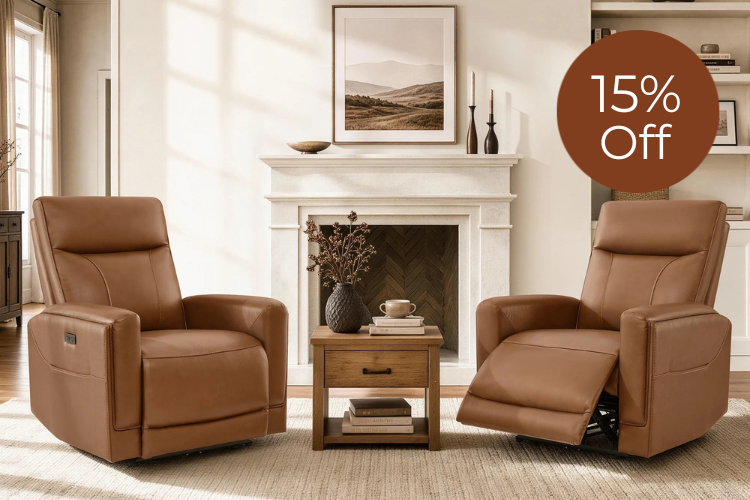
Setup friction remains real for some users. If the recliner’s firmware is outdated or the home network has weak mesh coverage, voice responses can lag or fail entirely. Testing commands in the target room before purchase helps set realistic expectations. For models that combine voice readiness with ergonomic support, consider the Maxwell Genuine Leather Swivel Glider Recliner with Power Lumbar & Headrest.
App Control & Battery Intelligence: Managing Power Without the Cord
Cordless power recliners can still deliver reliable voice and app control when they incorporate Matter 1.4’s optimized “sleeping device” behavior. This standard reduces standby power draw so the chair can remain reachable for commands while preserving battery life for days or weeks depending on usage.
The companion app typically shows real-time battery percentage, sends low-power notifications, and lets you adjust preset positions or sensitivity. What this means in practice is that you can check the chair’s status from the kitchen or office rather than discovering a dead battery only when you sit down.
The core trade-off is between convenience and uptime. Always-on features increase standby consumption, so users who value a completely wire-free look must accept more frequent charging or choose models with larger batteries. In typical living-room use, most owners report charging every 7–14 days when routines are moderate.
For those seeking deep relaxation without cords, the Leif Super Zero Gravity Power Leather Recliner illustrates how battery intelligence can support extended zero-gravity sessions while maintaining smart connectivity.
From Seating to Scenes: Movie vs. Recovery Routines
Smart routines deliver the highest daily value when they eliminate repeated manual effort. Two common patterns illustrate the difference.
Home-theater enthusiasts often build a “Movie Mode” scene that simultaneously dims lights, closes blinds, and moves the recliner into a preferred viewing position with one voice command or scheduled trigger. These multi-device scenes feel magical when they work, yet they remain sensitive to network hiccups or the deliberate slow motion required by safety standards.
Wellness-focused users typically prefer simpler “Recovery Mode” routines that call a zero-gravity or lumbar-support preset on demand. The value here comes from consistent posture relief after workouts or long workdays, not from orchestrating an entire room. Because these routines involve fewer devices, they tend to be more reliable and place less demand on battery life.
The NASA-derived zero-gravity position reduces spinal pressure by elevating the legs above the heart, making it a practical wellness tool rather than a gimmick. Our separate guide on Finding Relief: The Best Zero Gravity Recliners for Back Pain in 2026 explores posture mechanics in greater depth.
Ultimately, smart features pay for themselves when they replace a 15-second manual button hold you perform every single day. If your routine involves complex multi-device coordination that fails more often than it succeeds, a simpler non-smart recliner with excellent mechanical comfort may be the wiser choice. See The Aesthetic Recliner: Hidden Power for Modern Living Rooms for design-first options that prioritize looks over connectivity.

Safety and Durability: UL 962 Standards for Smart Seating
Motorized furniture must comply with UL 962, which caps movement speed at roughly one inch per second for any component that could cause entrapment. This deliberate pace prevents sudden motion that might pinch fingers, trap children, or startle pets. As a result, even the most advanced “instant” scene still takes several seconds to complete its full travel.
Households with young children or pets should treat automated routines as supervised actions rather than set-and-forget events. The standard requires clear “Risk of Injury” warnings, and responsible manufacturers include physical lockout switches or app-based child locks.
Choosing a recliner from a brand that carries verifiable UL 962 certification for both the motor system and the electronic controls remains the most reliable way to reduce the “electronics lottery” that can appear in lower-cost connected furniture. This official UL resource on furniture safety requirements details the entrapment and speed limits that protect users.
Reviewing these safety elements early helps avoid regret. A recliner that looks perfect on paper but moves too aggressively or lacks proper warnings can create more stress than relaxation. Our overview of Recliner Functions 101: A Comprehensive Guide covers additional mechanical safety points to cross-check.
2026 Smart Recliner Buying Checklist: Status Without Sacrifice
Use this checklist to filter options before you buy:
- Matter/Thread Compatibility — Confirm native support for your primary voice ecosystem rather than promised future updates.
- Preset Flexibility — Verify the app lets you save and name multiple custom positions, including zero-gravity and lumbar settings.
- Battery Management — Look for clear percentage readouts, low-power alerts, and realistic runtime claims based on your planned routine frequency.
- Return Policy Reality — Many large furniture items carry a 15–20 % restocking fee. Test the app and voice performance thoroughly within the trial window, and keep all original packaging.
- Room Fit and Aesthetics — Ensure the recliner’s footprint and styling match your living room so the smart features do not compromise the “status without sacrifice” goal.
Buyers in small or apartment spaces should also consult Big Comfort, Small Footprint: The Best Power Recliners for Apartments and Cozy Rooms for placement and wall-clearance guidance.
Smart recliners suit design-conscious homeowners who already run routines with lights, blinds, or thermostats and who value removing daily manual adjustments. They are a weaker fit for households that experience frequent Wi-Fi instability, have very young unsupervised children, or expect Hollywood-style instant motion. Checking your network strength, tolerance for occasional charging, and willingness to learn the app first will prevent most common disappointments.
How Do I Link My Recliner to Multiple Voice Assistants at Once?
Most Matter-certified recliners can be linked to Apple Home, Google Home, and Alexa simultaneously through the unified standard. Add the device once in the manufacturer app, then enable it in each assistant’s skill or home settings. Test each platform separately because command phrasing and response speed can differ slightly.
What Happens If the Battery Dies During a Routine?
The recliner will stop mid-motion and usually emit an audible or app notification. Most 2026 models include a manual override lever or button that lets you return to a neutral sitting position without power. Recharging restores full smart functionality, which is why checking battery health daily through the app prevents interruptions.
Can I Use Smart Recliners Safely Around Pets?
Yes, provided you supervise automated scenes and use any available child/pet lock features in the app. The UL-mandated slow movement speed reduces injury risk, but pets can still be startled or attempt to climb onto a moving chair. Keep routines manual when pets are loose in the room.
How Often Will I Need to Charge a Cordless Smart Recliner?
Usage patterns vary. Light daily use with one or two zero-gravity activations typically requires charging every 10–14 days. Heavy home-theater routines that trigger multiple devices can shorten that to 5–7 days. Matter 1.4’s power optimizations help, but always confirm the manufacturer’s runtime claims against your expected routine complexity.
Are Voice Commands Reliable Enough for Daily Use?
In strong Thread mesh networks, yes. Reliability drops in homes with spotty Wi-Fi or thick walls that weaken signals. Using unique nicknames, keeping firmware updated, and placing a Thread border router near the living room all improve consistency. Many users treat voice as the primary input and keep the physical remote or app as backup for critical moments.
Recommended Products




More to Read
 7 Sofa Trends That Actually Improve Comfort in 2026
Upgrade your living room with furniture that supports your body. Here are 7 modern sofa features designed to maximize your daily comfort...
7 Sofa Trends That Actually Improve Comfort in 2026
Upgrade your living room with furniture that supports your body. Here are 7 modern sofa features designed to maximize your daily comfort...
 Mother's Day Gift Guide: Cozy and Stylish Furniture Picks for Modern Moms
Make Mother's Day more meaningful with furniture gifts that bring comfort, smart features, storage, and quiet luxury into her everyday routine.
Mother's Day Gift Guide: Cozy and Stylish Furniture Picks for Modern Moms
Make Mother's Day more meaningful with furniture gifts that bring comfort, smart features, storage, and quiet luxury into her everyday routine.
 Performance Fabric Reality Check: Does It Really Repel Pet Hair and Stains?
Performance fabric is often marketed as a miracle solution for homes with pets and kids, but the reality is more nuanced. It...
Performance Fabric Reality Check: Does It Really Repel Pet Hair and Stains?
Performance fabric is often marketed as a miracle solution for homes with pets and kids, but the reality is more nuanced. It...