
















































Standard sideboards often fail modern tech because they trap heat from high-performance consoles and create signal dead zones for AI hubs and smart-home controllers. In 2026, a tech-ready sideboard uses passive airflow, strategic clearance, and RF-transparent materials to keep devices cool, connected, and hidden without sacrificing living-room aesthetics.

Why Traditional Sideboards Fail the 2026 Tech Test
Most living-room cabinets were designed for books, dinnerware, or decorative items rather than devices that generate sustained heat and rely on wireless signals. When you place a PS5 or Xbox Series X inside a typical enclosed sideboard, heat builds quickly because solid backs and tight compartments prevent natural convection. This leads to thermal throttling, louder fan operation, and, over time, reduced hardware lifespan.
Solid panels and dense construction also act like partial Faraday cages. AI hubs using Zigbee, Thread, or Matter protocols operate on low-power signals that drop out before the device itself overheats. Cable congestion compounds both problems: bundled power bricks and stiff HDMI cords create a physical "cable dam" that blocks the very airflow paths the cabinet needs.
The result is a frustrating choice between visible tech clutter on top of furniture or hidden devices that underperform. Tech-ready designs solve this by treating ventilation, signal transparency, and cable routing as core structural requirements rather than afterthoughts.
Measuring for High-Heat Hardware: The 4-Inch Clearance Rule
Device manufacturers publish precise clearance requirements that directly determine whether a sideboard will work safely. Sony's official guidance states that the PS5 needs at least 4 inches (10 cm) of clearance from any wall surface to avoid recirculating hot exhaust air (PlayStation 5 Safety Guide). Microsoft recommends a minimum of 1.5 inches (4 cm) of clearance above the Xbox Series X when oriented vertically so its parallel cooling architecture can exhaust heat effectively (Xbox Series X|S FAQ).
These are not suggestions. Insufficient clearance causes the console fans to run continuously and can trigger performance throttling during demanding games. In a sideboard, this translates to needing deeper compartments and higher internal shelves than many decorative cabinets provide.
Cables add another practical constraint. Stiff HDMI and power cords typically require around 10 inches of total depth so the device can sit forward enough to maintain rear and top clearance without strain on the ports. The chart below summarizes these manufacturer-backed thresholds to help you evaluate any sideboard's internal dimensions before purchase.
Minimum Clearance Specs for a Sideboard Setup
Use the exact manufacturer clearances for the console placements, and treat cable depth as a practical planning allowance rather than a manufacturer spec.
View chart data
| Category | Minimum clearance |
|---|---|
| PS5 rear clearance | 4.0 |
| Xbox Series X top clearance | 1.5 |
| Cable depth allowance | 10.0 |
Measure your intended devices first. If a cabinet's internal depth is under 14–16 inches after accounting for the device footprint plus these clearances, it is likely not suitable for sustained high-heat gaming sessions.

Passive Airflow and the "Chimney Effect" in Modern Cabinetry
Heat rises naturally, so the most reliable passive cooling method creates a chimney-like path: cool air enters low, warms as it absorbs device heat, and exits high. This convection loop works without fans when the sideboard provides unobstructed intake at the bottom and exhaust at the top or upper rear.
High-leg bases deliver the most consistent bottom intake because they lift the entire cabinet, allowing room air to flow underneath without visible vents that disrupt clean lines. Our VR Gear and Smart Hub Storage: The 2026 Tech-Infrastructure Sideboard Guide explains how this design principle prevents heat pockets better than simple cutouts in a flat base.
Slatted or fluted doors offer an attractive exhaust route when paired with that rear or top opening. The vertical channels in fluted panels allow air to move while keeping the front elevation looking like refined furniture rather than AV equipment. However, slats alone are not enough if the back remains fully sealed; the chimney effect still needs a complete intake-to-exhaust loop.
For decorative sideboards you already own, reversible modifications such as removing a rear service panel or adding a high-leg riser can often create adequate airflow. Yet if a design cannot support both bottom intake and upper exhaust without permanent cuts, treat it as display storage rather than active console housing. This scenario split prevents overpromising that every attractive cabinet can safely manage high-heat devices.
The Stealth AI Hub: Balancing Material Transparency with Signal Strength
Smart-home hubs and routers fail more often from blocked signals than from heat. According to AT&T's Wi-Fi interference guidance, metal components can block 90–99% of wireless signals, while wood typically causes only 3–8 dB of attenuation (Wi-Fi Interference: Things That Block Wi-Fi Signal). This makes wood or mesh the practical sweet spot for concealed AI hub compartments.
Place the hub centrally within the sideboard rather than in a rear corner, and avoid bundling cables directly around it. The compartment should remain a partial enclosure with a bottom intake and top exhaust path so the chimney effect still functions. Deeply recessed or fully metal-lined enclosures push connectivity failure ahead of thermal concerns.
For most 2026 smart homes, prioritize RF-transparent materials first. A wood sideboard positioned near the center of the living room usually keeps Zigbee and Thread devices responsive, whereas a metal cabinet in the same location often creates persistent dead zones. Our internal testing and the linked AT&T resource both confirm this ordering of priorities.
Cable Routing vs. Airflow: Organizing Without the "Cable Dam"
Well-organized cables improve both appearance and performance, but only when routing supports rather than fights airflow. Keep power bricks separated from data lines to reduce electromagnetic interference and localized heat clusters. Run cables through vertical channels or dedicated rear troughs that stay clear of intake and exhaust zones.
The common mistake is forcing stiff HDMI and power cords into tight 90-degree bends or piling them directly behind the console. This creates back pressure that stalls the chimney effect even in an otherwise well-ventilated cabinet. Maintain the manufacturer's recommended bend radius and use the 10-inch depth allowance discussed earlier so devices sit forward enough for air to circulate behind them.
Adjustable shelves with pre-drilled or grommeted routing points make this far easier. When cables remain loose and separated, you avoid both signal degradation and the heat-trapping "cable dam" that leads to regret after installation.
Open-Back vs. Slatted Doors: Choosing the Right Ventilation Style
Open-back designs offer the simplest thermal performance because they remove the largest possible obstruction to rear exhaust. Many owners of high-heat consoles simply remove the rear panel entirely during active gaming seasons. This reversible step preserves the sideboard's front appearance while delivering near-open-air cooling.
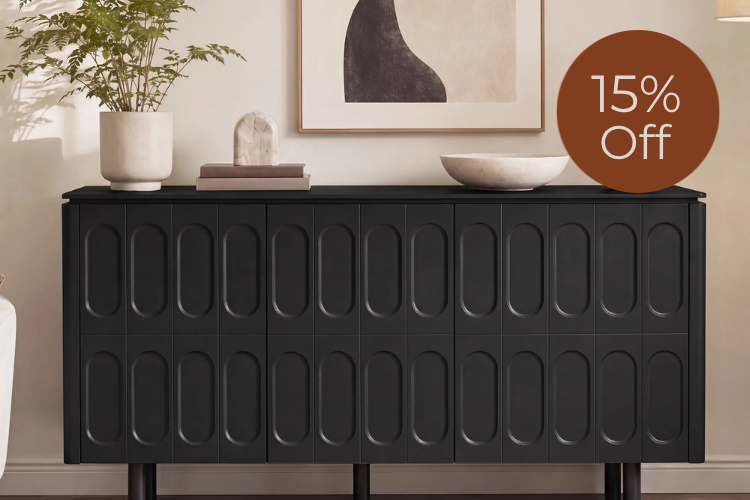
Slatted or fluted doors, such as those on the Rex, provide a middle path. The vertical grooves allow continuous passive exhaust across the front while hiding the devices behind an elegant facade. They perform best when the cabinet also has high legs for intake and at least partial rear opening above the device shelf.
Solid-door sideboards work well for low-heat accessories and RF-light hubs but are generally unsuitable as primary homes for game consoles. If your device mix includes only streaming boxes, cable modems, or a centrally placed AI controller, a fully enclosed design with proper material choices can succeed. For anything generating significant sustained heat, open-back or slatted options with documented clearance become the safer default.
Selecting Your Tech-Ready Sideboard: A 2026 Decision Framework
Match the cabinet to your specific device mix using this practical checklist: high-leg base for intake, RF-transparent wood or mesh construction, adjustable shelves spaced for manufacturer clearance, and integrated or grommeted cable routing. Verify total internal depth supports the 4-inch PS5 rear rule, 1.5-inch Xbox top rule, and cable allowance simultaneously.
The Samuel Scandinavian Sideboard with Metallic Lacquer Door offers versatile aesthetics and solid wood construction that works for mixed smart-home loads. The Clara Contemporary Wood Sideboard includes thoughtful cable management channels and adjustable shelving that simplifies routing without blocking airflow. For maximum passive ventilation with refined style, the Rex Contemporary Fluted Multi-section Sideboard Buffet uses its fluted panels as hidden exhaust while maintaining a clean living-room presence.
If your setup is gaming-heavy, prioritize open-back or easily modified designs and confirm clearances first. For smart-home dominant rooms, focus on wood construction and central placement. When a cabinet meets the material, clearance, and airflow criteria above, it delivers both the luxury look and the thermal safety 2026 devices require.
FAQs
How Much Clearance Does a PS5 Need Inside a Sideboard?
Sony requires at least 4 inches (10 cm) of clearance from any wall or obstructing surface. In a sideboard this usually means the internal depth must accommodate the console plus this gap so exhaust air does not recirculate. Always measure the specific compartment before purchase.
Can I Hide an AI Hub in a Wooden Sideboard Without Losing Signal?
Yes, provided the wood is not excessively thick and the hub sits centrally rather than deeply recessed. Wood causes modest 3–8 dB attenuation compared with metal's near-total blockage. Keep cables uncluttered and maintain a bottom-to-top airflow path to avoid secondary heat or interference problems.
Do Slatted Doors Provide Enough Ventilation for Game Consoles?
Slatted doors help when combined with a high-leg base for intake and a rear or upper exhaust opening. Alone they are usually insufficient for sustained high-heat sessions. Test temperatures after a long gaming session or choose an open-back model for the most demanding setups.
Should I Remove the Back Panel of My Sideboard for Better Airflow?
For high-heat consoles this is often the most effective reversible modification. It creates the largest possible exhaust area and works especially well with high-leg bases. Reattach the panel when the console is not in use if aesthetics matter. Avoid permanent cuts that could affect warranty or resale value.
What Materials Block Wireless Signals for Smart Home Devices?
Metal is the primary offender, potentially blocking 90–99% of Wi-Fi, Zigbee, or Thread signals. Thick solid wood or dense composites cause measurable but usually tolerable attenuation. Mesh panels or thin wood doors offer the best balance of concealment and connectivity.
How Do I Prevent Cables From Blocking Airflow in a Media Cabinet?
Route power bricks and HDMI cables through dedicated vertical channels or grommets that stay clear of intake and exhaust vents. Maintain at least 10 inches of total depth so the console can sit forward. Keep bundles loose and separated rather than tightly packed behind the device.
Recommended Products



More to Read
 7 Sofa Trends That Actually Improve Comfort in 2026
Upgrade your living room with furniture that supports your body. Here are 7 modern sofa features designed to maximize your daily comfort...
7 Sofa Trends That Actually Improve Comfort in 2026
Upgrade your living room with furniture that supports your body. Here are 7 modern sofa features designed to maximize your daily comfort...
 Mother's Day Gift Guide: Cozy and Stylish Furniture Picks for Modern Moms
Make Mother's Day more meaningful with furniture gifts that bring comfort, smart features, storage, and quiet luxury into her everyday routine.
Mother's Day Gift Guide: Cozy and Stylish Furniture Picks for Modern Moms
Make Mother's Day more meaningful with furniture gifts that bring comfort, smart features, storage, and quiet luxury into her everyday routine.
 Performance Fabric Reality Check: Does It Really Repel Pet Hair and Stains?
Performance fabric is often marketed as a miracle solution for homes with pets and kids, but the reality is more nuanced. It...
Performance Fabric Reality Check: Does It Really Repel Pet Hair and Stains?
Performance fabric is often marketed as a miracle solution for homes with pets and kids, but the reality is more nuanced. It...