















































High-performance remote workers often hit a wall by early afternoon, with cognitive fatigue, tight shoulders, and declining focus making the rest of the day a grind. A structured 20-minute reset using a zero gravity recliner offers a practical way to address both the physical tension from desk work and the mental fog that traditional breaks rarely fix. By combining NASA's neutral body posture with a timed micro-nap, this routine helps many users return to deep work feeling clearer and more alert—provided the session stays short and intentional.

The Afternoon Energy Crash: Why Traditional Breaks Fail Remote Workers
By mid-afternoon most knowledge workers have logged four to six hours of focused screen time. Reaction times slow, decision quality drops, and physical discomfort from spinal compression adds a layer of distraction that coffee or scrolling rarely resolves. These micro-breaks often increase cognitive load through notifications or sugar crashes rather than restoring capacity.
Standard office chairs keep the spine compressed and the diaphragm restricted, creating low-level physical “noise” that competes with mental bandwidth. Many remote professionals report that a quick walk or snack helps temporarily but fails to deliver the rapid, reliable reset needed between back-to-back meetings or deep-work blocks. This gap is exactly where a targeted 20-minute protocol using zero-gravity positioning becomes relevant for 2026’s high-stress home-office culture.
The key is treating the recliner as a scheduled recovery station rather than an all-day seat. When physical tension is high enough to interfere with attention, a bounded reset that combines posture change and short rest can bridge the gap back to productive focus. If your afternoon tasks require immediate high execution, keep the session under 30 minutes to avoid any grogginess.
The Science of Weightless Focus: NASA’s 128-Degree Rule
NASA research on astronauts in microgravity identified a neutral body posture with a roughly 128-degree angle between torso and thighs as the position where the musculoskeletal system experiences the least stress (NASA Spinoff). Zero gravity recliners are engineered to replicate this angle, allowing the spine to decompress while the body feels supported rather than compressed.
This decompression reduces pressure on spinal discs and improves circulation of oxygen and nutrients. A 2025 study in Communications Medicine found that relieving spinal compression can support functional brain remodeling and better neurological coordination, potentially aiding focus during demanding cognitive tasks (Nature article). In plain terms, lowering constant physical strain frees up mental resources that would otherwise be spent managing discomfort.
Zero gravity positioning also eases pressure on the diaphragm, supporting fuller breaths and better oxygenation—another subtle advantage when afternoon alertness is fading. What this means for remote workers is that the posture itself acts as a low-effort bridge to recovery rather than a replacement for proper desk ergonomics.
For most users the benefit appears when tension has built enough to compete with attention. The recliner is not a cure for chronic issues or a substitute for movement throughout the day. Instead, it functions best as a deliberate 20-minute intervention. Standard sitting generally creates higher physical load, while the 128-degree position rates as a lower-stress recovery zone—useful context when deciding whether a zero gravity recliner fits your workflow.

The 26-Minute Power Metric: Why Short Naps are Biohacking Gold
A landmark NASA study on long-haul pilots showed that a planned 26-minute nap improved performance by 34% and physiological alertness by 54% in high-stress conditions (NASA NTRS report). This finding underpins the productivity case for micro-naps, but the window is narrow: naps longer than about 30 minutes often trigger sleep inertia—the groggy hangover that can impair focus for up to an hour afterward.
Keeping the reset between 20 and 26 minutes avoids deep sleep stages while still delivering restorative effects. Research on strategic napping confirms that short naps provide immediate alertness gains without the downside of longer ones (Strategic Napping Guide). The zero gravity recliner improves this protocol because its supportive posture makes it easier to relax quickly without fully committing to bed-level sleep.
The ideal circadian window for most remote workers falls between 1:30 p.m. and 3:30 p.m., when natural post-lunch dips occur. Timing the reset here maximizes the alertness boost while minimizing interference with nighttime sleep. A zero gravity chair is often superior to a couch or bed for this use because it keeps the body in a controlled, semi-upright position that supports faster, lighter rest and easier re-entry into work.
NASA Nap Sweet Spot: Alertness vs. Grogginess Risk
Threshold bands based on NASA pilot research and strategic napping studies show the productivity advantage peaks near 26 minutes while sleep inertia risk stays low. Shorter naps offer less restoration; longer ones raise grogginess.
Show Data Table
| Nap Duration | Alertness / Performance Value (1-5) | Sleep Inertia Risk (1-5) |
|---|---|---|
| 10 min | 2 | 1 |
| 20 min | 4 | 2 |
| 26 min | 5 | 1 |
| 30 min | 4 | 3 |
| 45+ min | 2 | 5 |
The chart above visualizes the pattern in typical setups: alertness value climbs sharply around the 20–26 minute mark before declining as inertia risk rises. Use it as a planning guideline rather than a rigid rule—individual response varies with prior sleep and caffeine intake.
Building Your 2026 Performance Station: Setup and Gear
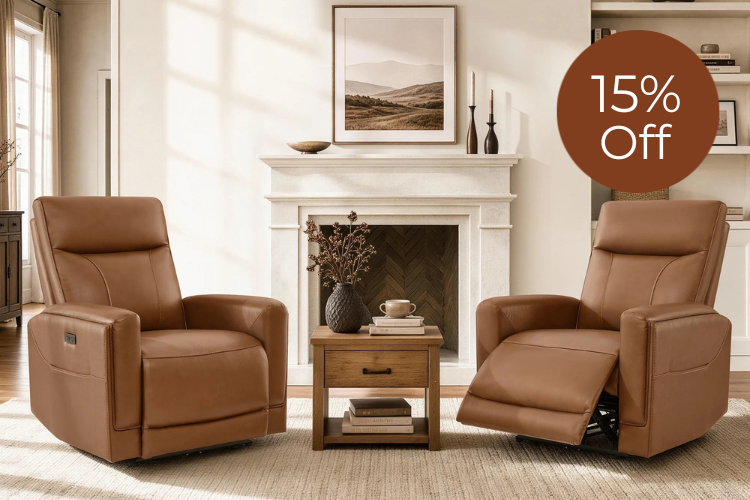
Limited home-office space makes wall-hugger designs essential. Models that require only a few inches of rear clearance, such as the Keni Wall Hugger Power Recliner with Power Headrest, stay functional even when placed near a desk. This geometry prevents the recliner from becoming a layout-breaking piece of furniture and supports quick transitions between work and reset.
A power headrest adds practical value by letting you maintain line-of-sight to notes or a secondary screen during lighter recovery moments. Breathable genuine leather or performance fabrics, like those on the Victor Genuine Leather Power Recliner with Heat & Cooling, resist heat buildup better than overly soft foams that can encourage deeper, less controllable sleep. Integrated USB-C ports on chairs such as the Noah Zero-Gravity Genuine Leather Recliner with Power Headrest keep devices charged without forcing you to leave the station.
For tighter rooms the Murphy Premium Dual-Motor Genuine Leather Zero-Wall Power Reclining Sofa or similar zero-wall options minimize footprint while still delivering the 128-degree posture. The goal is a compact performance station placed within arm’s reach of your desk so the recliner serves as a deliberate transition point rather than a procrastination zone. If your space cannot accommodate even a wall-hugger without blocking flow, a dedicated recovery room or simpler seating may be the more practical choice.
See also our guide on Biohacking Your Living Room: Using Zero Gravity Recliners for Daily Athletic Recovery for complementary positioning tips and the broader Rise of the Wellness Recliner: Why Zero Gravity Is a Smart Living Room Upgrade for style considerations.
The 3-Step Protocol: Implementing the Midday Reset Routine
Start by clearing visual clutter from your immediate desk area and setting a gentle 26-minute timer. This simple transition signals to your brain that work mode is paused. Sit in the zero gravity recliner, adjust to the full 128-degree position using the power controls, and allow your body to settle—most users report the posture alone reduces shoulder and lower-back tension within the first few minutes.
During the timed rest, keep the session passive but controlled. A power headrest helps if you want to review a short note or maintain a comfortable neck angle. Avoid full sleep if your next task demands sharp thinking; the NASA-derived window is designed for light rest rather than deep slumber.
For the re-activation step, many high-performers use a brief cognitive ritual such as 30–60 seconds of controlled breathing, a quick hydration break, or reviewing one priority task. Emerging research on post-nap protocols suggests these light activation steps help lock in the alertness gains and reduce any residual transition fog. Experiment within the first week to find what reliably returns you to flow state fastest. Track your energy for a few days in a simple notebook; most users notice the routine becomes automatic after 10–14 uses.
Treat the entire protocol as a recovery tool, not an ergonomic workstation. If you find yourself defaulting to the chair for prolonged work sessions, it may be time to reassess desk setup or add more movement breaks. The 20-minute reset works best when it stays bounded and scheduled.
How to Make the 20-Minute Reset a Consistent 2026 Habit
Anchor the reset to an existing calendar event—many remote leaders block 2:00–2:30 p.m. daily. Place the recliner within three steps of your primary workspace so the physical transition cost stays low. Pair the routine with a consistent cue, such as closing your laptop lid or starting a specific ambient track, to strengthen the habit loop.
Review weekly whether the reset is improving your 3–6 p.m. output or simply becoming another lounging habit. If afternoon energy remains flat after three weeks of consistent use, examine sleep quality, hydration, or screen-time boundaries first. The recliner is one high-leverage piece of a larger productivity system, not a standalone fix. When used with clear time boundaries and an activation step afterward, the 20-minute zero-gravity reset can become a repeatable advantage for knowledge workers navigating 2026’s demanding schedules.
FAQs
How long should a zero gravity power nap last for productivity?
Most research points to a 20–26 minute window. This range captures restorative benefits while staying well below the threshold that typically triggers sleep inertia. Set a timer and aim to rise promptly; many users find 22 minutes strikes the best personal balance between restoration and quick return to tasks.
Can I use a zero gravity recliner as my main home office chair?
It is generally better reserved for scheduled reset periods rather than all-day desk work. Prolonged use in a deeply reclined posture can reduce the ergonomic support needed for typing and screen focus. Keep a dedicated task chair at your desk and use the recliner only for the bounded 20-minute protocol.
What features should I prioritize for a productivity-focused zero gravity recliner?
Look for wall-hugger or zero-wall clearance so it fits near your desk, a power headrest for adjustable sightlines during lighter recovery, and breathable upholstery that prevents overheating. Built-in USB-C ports are convenient for keeping devices ready without breaking the reset flow.
Is there a best time of day for the 20-minute reset?
The early-to-mid afternoon window (roughly 1:30–3:30 p.m.) aligns with most people’s natural post-lunch energy dip. Taking the reset too late can interfere with nighttime sleep, while an earlier slot may miss the peak fatigue many remote workers experience.
How do I avoid turning the recliner into a procrastination spot?
Schedule the reset like any other meeting and use a visible timer. Position the chair close to your desk rather than in a separate relaxation corner. After the timer ends, follow immediately with a 30-second activation ritual—standing, hydrating, or stating your next single task—to reinforce the recovery-to-work transition.
Are there safety considerations when using zero gravity recliners daily?
Most healthy adults can use them safely for short sessions, but consult a healthcare professional if you have recent spinal surgery, severe mobility limitations, or conditions that affect blood pressure. Rise slowly after reclining, especially if you feel lightheaded. The chair is a wellness tool, not medical equipment.
What if my home office is too small for a full-size recliner?
Choose a compact wall-hugger model or a swivel accent chair with power footrest. Even a smaller footprint version can deliver the 128-degree posture. If space remains an issue, consider whether a high-quality floor cushion or adjustable footrest paired with desk posture resets might be a more practical starting point before investing in larger furniture.
Recommended Products




More to Read
 7 Sofa Trends That Actually Improve Comfort in 2026
Upgrade your living room with furniture that supports your body. Here are 7 modern sofa features designed to maximize your daily comfort...
7 Sofa Trends That Actually Improve Comfort in 2026
Upgrade your living room with furniture that supports your body. Here are 7 modern sofa features designed to maximize your daily comfort...
 Mother's Day Gift Guide: Cozy and Stylish Furniture Picks for Modern Moms
Make Mother's Day more meaningful with furniture gifts that bring comfort, smart features, storage, and quiet luxury into her everyday routine.
Mother's Day Gift Guide: Cozy and Stylish Furniture Picks for Modern Moms
Make Mother's Day more meaningful with furniture gifts that bring comfort, smart features, storage, and quiet luxury into her everyday routine.
 Performance Fabric Reality Check: Does It Really Repel Pet Hair and Stains?
Performance fabric is often marketed as a miracle solution for homes with pets and kids, but the reality is more nuanced. It...
Performance Fabric Reality Check: Does It Really Repel Pet Hair and Stains?
Performance fabric is often marketed as a miracle solution for homes with pets and kids, but the reality is more nuanced. It...