








































Choosing the Right Foundation for Your Large TV
Choosing the right TV stand or media console for a large TV in 2026 means starting with fit, viewing comfort, and real storage needs before style. The screen should sit near eye level or slightly below for comfortable long viewing sessions, while the stand must safely support the TV's base, weight, and any accessories without crowding the room or creating clutter. This guide walks through the key checks that help you avoid common regrets such as a too-narrow or unstable stand, insufficient storage, or delivery surprises with fully assembled pieces.
Related Guides
- Sleek and Grounded: Why Low-Profile Media Consoles Are the Ultimate Minimalist Choice
- Mastering the Layout: How to Arrange Your Recliner, Sofa, and TV Stand for Perfect Flow

How to Choose the Right TV Stand for a Large TV
Large TVs (65-inch and above) change the decision process because they demand more attention to stability, clearance, and daily usability than smaller sets. The core risks include selecting a stand that is too narrow for the TV base, too low for comfortable viewing, too shallow for cables and components, or underbuilt for the combined weight. Poor cable management or mismatched storage can also lead to ongoing clutter or safety concerns in family rooms.
Start by measuring your actual TV base footprint, viewing distance, and room layout rather than relying on screen size alone. This pillar guide provides a practical 2026 framework for living rooms and family rooms, helping you prioritize comfort and function so the final console looks good and works well for years. Later sections break down sizing thresholds, height and depth considerations, storage by lifestyle, cable management, fully assembled options, and style decisions.
TV Stand Size Guide for 65-Inch, 75-Inch, and 85-Inch TVs
For large TVs, the safest approach begins with viewing comfort rather than a single width formula. The top of the screen should sit near eye level or slightly below when seated, as this ergonomic target helps reduce neck strain during extended viewing (University of Michigan ergonomics guidance).
Width is best treated as a footprint and stability check instead of a universal ratio. No single width formula safely applies across all 65-, 75-, and 85-inch models because base designs and weight distribution vary significantly. The stand's usable top surface must fully support the TV base without overhang that compromises balance; if the console is narrower than the TV footprint or leaves the set visually and physically unsupported, the setup is a no-go. When manufacturer specs are available, weight capacity acts as a hard pass/fail gate: the stand must safely exceed the TV's weight plus any mounting hardware or soundbar load.
TV Stand Sizing Thresholds for Large Screens
Safe zones are shown as tiers: height comfort carries the most weight, footprint fit is a stability check, and weight capacity is a hard spec gate when available.
View chart data
| Category | Height comfort | Footprint fit | Weight capacity |
|---|---|---|---|
| 65 in | 3.0 | 2.0 | 2.0 |
| 75 in | 3.0 | 2.0 | 2.0 |
| 85+ in | 3.0 | 1.0 | 1.0 |
Based on ergonomic guidelines and typical manufacturer considerations; always verify product-specific TV base and stand specs.
If exact measurements are missing, confirm the TV's real base dimensions and the console's usable top surface before purchase. Our detailed media console guide for 75-inch and 85-inch TVs offers deeper product-specific checks on width, depth, and stability. Furniture and television tip-overs remain recognized hazards, so anchoring or restraints deserve consideration in homes with children or pets (CPSC safety documentation).
What Height Should a TV Stand Be?
Viewing comfort should drive height decisions more than any fixed formula. Many ergonomic sources recommend positioning the screen at or slightly below eye level when seated to minimize neck and back strain during long sessions (University of Michigan ergonomics guidance; USNH ergonomic checklist).
The ideal stand height therefore depends on your seating, typical viewing distance, and room layout. A low-profile console may work well for floor seating or deep sofas, while a taller unit better suits higher chairs or shorter viewing distances. Avoid assuming one universal height number applies across all setups; instead, test the range in your actual space. For extended family-room use, prioritize a height that keeps the center of the screen comfortably in your natural line of sight rather than forcing upward or downward glances.
How Deep Should a Media Console Be?
Depth matters for practical daily use. The console should accommodate the TV base, route cables without pinching or sharp bends, and leave sufficient clearance from the wall for airflow and access. A unit that looks appropriately sized in photos can still feel crowded in real life if it forces the TV too close to the wall or blocks walking paths.
Tie depth decisions to your specific room geometry: allow space behind the console for ventilation and cable runs while ensuring the overall footprint does not intrude on seating or traffic areas. Shallow designs sometimes compromise cable management or component storage, leading to visible clutter or strained cords. When evaluating options, prioritize usable interior depth over advertised external measurements and verify that your components (soundbar, streaming devices, game consoles) will fit comfortably without overhang or awkward placement.

Open Shelving, Closed Storage, or Mixed Storage?
The best storage style depends on your room use, clutter tolerance, and how often you need to access devices. In apartments or small spaces where visual calm matters most, closed storage often wins because it conceals routers, remotes, game accessories, and household items. High-traffic family rooms with children or frequent media swapping may favor open shelving or mixed designs for quick access, even if some gear remains visible.
Open shelving works well when you want to display speakers, decor, or frequently used components and do not mind a more curated look. Closed cabinets hide clutter effectively but can slow down access and sometimes restrict airflow for electronics. Mixed storage—open shelves paired with drawers or doors—offers a practical middle ground for most living rooms, letting you showcase a few items while concealing the rest. Match the choice to your lifestyle: if the room feels busy or shared, lean toward more closed compartments; if access frequency is high, keep at least some open space. This lifestyle-based filter prevents buying a beautiful cabinet that ultimately frustrates daily use.
Do You Need Cable Management in a TV Stand?
Cable management primarily solves visual clutter and safer cord routing rather than adding storage capacity. Well-designed routing keeps cords organized, prevents pinching or sharp bends, and creates a cleaner entertainment area that looks more intentional (Consumer Reports cable management guidance; ESTA cabling practices).
It does not replace the need for actual shelves or drawers; many stands with excellent cable channels still require separate storage planning for components. Look for rear cutouts, internal trays, or concealed channels that allow easy access for future upgrades. In practice, good cable management reduces the “tangle” effect that makes even tidy rooms feel messy, but it works best when paired with realistic expectations about what the console can actually hide versus what needs dedicated storage.
Fully Assembled TV Stands: Who They’re Best For
Fully assembled stands appeal to buyers who want to minimize setup time and avoid wrestling with instructions or missing parts. They can be a strong convenience choice for busy households or anyone who dislikes assembly, provided the unit also clears other practical hurdles.
Before choosing one, verify delivery access: a fully assembled piece may not fit through tight stairways, hallways, or doorways that a flat-pack option could navigate. Tip-over safety remains important regardless of assembly status—anchoring or restraints should still be part of final placement, especially in homes with children or pets (CPSC furniture safety notes). Check that the delivered footprint and height will suit your exact wall or alcove, because convenience evaporates if the console does not fit the intended space. Treat fully assembled status as one factor among fit, storage, and safety rather than the deciding feature. Our 71" Kyle 4-Door Black Solid Wood Display Sideboard, for example, arrives fully assembled and offers generous closed storage for those prioritizing low-hassle setup.
How to Match Style Without Sacrificing Function
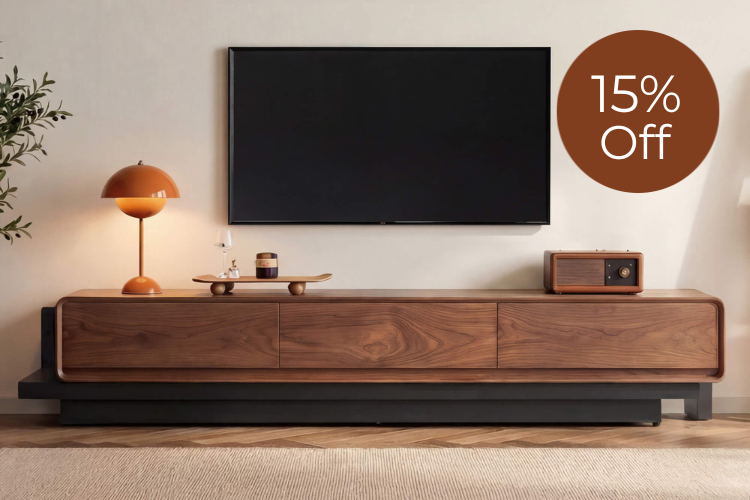
Style choices deliver the most satisfaction when they come last, after fit, height, storage, and cable management are already solved. Match finish, profile, and scale to your existing furniture and room proportions so the console complements rather than competes with the large TV. Low-profile modern designs can look sleek under 75- or 85-inch screens, while classic wood tones add warmth to traditional living rooms.
Avoid selecting purely on appearance in photos; a minimalist console that looks perfect online may lack the depth or weight capacity your setup requires. Focus on visual balance: the stand should appear proportional to the TV without dominating the wall or looking undersized. Materials such as oak veneer, travertine, or ceramic tops can elevate the look while providing durable surfaces. Explore our 79" Aaron Modern Travertine Large-Capacity TV Console for an elegant mixed-material option or the 79" Moore Modern Wood TV Stand with Drawer for clean contemporary lines with practical storage.
How to Choose the Best Media Console for Your Living Room
Prioritize in this order: viewing height comfort first, then stable footprint and weight capacity, followed by storage that matches your room’s actual use, effective cable management, delivery and assembly practicality, and finally style. A quick self-check includes confirming the TV base fits the console top, the screen lands near eye level from your main seating, weight specs are adequate, storage type aligns with clutter tolerance and access needs, and the unit can be safely placed and anchored if required.
For apartment dwellers, compact mixed or closed storage often prevents visual chaos. In busy family rooms, prioritize open or mixed designs plus robust cable routing and tip-over mitigation. Buyers who dislike assembly should consider fully assembled models like the 71" Eason Vintage Oak TV Stand with Drawers after verifying delivery paths. Our 71" Chad Classic Open Shelf Functional TV Stand with Drawer or 71" Rex Curved Fluted Wooden TV Stand with Drawer illustrate how different storage philosophies can still deliver strong function.
Additional reading on related topics includes our guide to TV stands for gaming setups, tips for styling your TV stand and media console, and advice on flawless cable management. Choosing with these checks in mind helps you land the right media console the first time and enjoy a clean, comfortable entertainment space for years.
Frequently Asked Questions
What is the ideal TV stand width for an 85-inch TV? There is no universal width that works for every 85-inch model. Measure the TV’s actual base footprint and select a console whose usable top surface fully supports it with a safety margin on each side. Stability and proportional appearance matter more than a fixed ratio; always verify weight capacity as well.
Should I choose open or closed storage for a family room? Closed or mixed storage is usually preferable in high-traffic family rooms because it conceals kid clutter, remotes, and miscellaneous items. Open shelving works better when frequent access to gaming consoles or media is the priority and you are comfortable maintaining a curated display.
Are fully assembled TV stands safer than those requiring assembly? Assembly status does not determine safety. Fully assembled units still require proper placement, leveling, and ideally anchoring to mitigate tip-over risk, especially with large TVs. The primary advantage is reduced setup time, provided the piece fits through your doorways and suits your space.
How important is cable management compared to storage? Cable management improves appearance and cord safety but does not create additional storage space. Plan storage separately for components and accessories; good cable channels simply keep the visible area tidy and protect wires from damage.
What height is best for a TV stand with a 75-inch TV? The best height keeps the center of the screen near eye level or slightly below when you are seated in your primary viewing position. This varies with sofa height and distance, so test the range in your room rather than relying on a single number.
Do I need a deeper console for larger TVs? Deeper consoles generally provide better support for wide bases, room for cable routing, and space for soundbars or components without forcing the TV against the wall. Depth should also leave adequate clearance for walking paths and airflow in your specific layout.