















































Hidden Tech: The Best Power Recliner Features You Didn't Know You Needed
Modern living rooms increasingly demand furniture that delivers both comfort and convenience without sacrificing style. Power recliners with thoughtfully integrated technology, such as built-in charging ports and smooth mechanical adjustments, can reduce visible clutter while supporting everyday routines like device charging during TV time or easy repositioning for conversation. The key is identifying which hidden features genuinely improve daily use and which add cost without meaningful benefit.
Choosing the right combination depends heavily on your room layout, how often you charge devices while seated, and whether the chair needs to serve multiple viewing angles. Features like USB ports, swivel bases, zero-wall mechanisms, and power-adjustable components each address specific pain points, but not every upgrade pays off for every household.
Do USB and USB-C Ports Actually Matter in a Power Recliner?
Built-in charging ports eliminate the need for separate power strips or dangling cords near your seating area. Many power recliners now include USB-A, USB-C, or both, allowing you to top up phones, tablets, or accessories without leaving the chair. However, these ports are typically designed for low to moderate power draw.
As the official USB Power Delivery specification explains, USB-C paired with Power Delivery can support higher-power charging for compatible devices, yet actual performance still depends on the recliner's internal power supply and the specific device. In practice, most furniture ports work best for phones and tablets rather than replacing a dedicated laptop charger.
Expert Tip: If you plan to use the port daily, check if the manufacturer specifies the wattage. A port providing at least 10W–15W is standard for modern smartphones; anything lower may result in "trickle charging" that feels frustratingly slow.
This convenience does come with a caution. Some powered recliners with USB ports have faced recalls due to overheating hazards, as noted in CPSC announcements. Always verify safety certifications (such as UL or ETL marks) and ensure proper cord routing during setup to avoid pinching wires in the reclining mechanism.
Swivel, Glide, and Zero-Wall: Which Upgrades Are Real?
Mechanical features are not purely "comfort theater." They solve specific architectural and lifestyle problems:
- Swivel Bases: Allow the chair to rotate (usually 270 to 360 degrees). This is a high-value feature for open-concept rooms where you might shift between watching TV and facing guests in the kitchen or dining area.
- Zero-Wall (Wall-Hugger) Mechanisms: These chairs slide forward as they recline. While a standard recliner might need 12–18 inches of clearance from the wall, a "zero-wall" model typically needs only 2–5 inches. This is the "best" feature for apartment dwellers.
- Glide/Rocking: Adds a gentle motion. While soothing, ensure the "glide" doesn't make the chair too difficult to exit if you have mobility concerns.
Posture support remains the foundation of any tech upgrade. As ergonomics resources highlight, stable seated positions matter more for long-term comfort than rotation alone. Look for chairs that combine these mechanisms with supportive lumbar and headrest adjustments rather than relying on motion as the primary selling point.
The "Best" Feature Combinations: A Decision Framework
To maximize your investment, match the technology to your specific "user profile." Not every feature is worth the premium in every room.
| User Profile | Priority Features | When to Skip |
|---|---|---|
| The Small Apartment Dweller | Zero-Wall Mechanism + USB-C | Skip Swivel (takes up more rotational "swing" space). |
| The Social Host | 360° Swivel + Hidden Cup Holders | Skip Power Headrests if the chair is mostly for conversation. |
| The Streaming Enthusiast | Power Headrest + USB-C + Lumbar Support | Skip Glide/Rocking (can be distracting during intense movies). |
| The Minimalist | Hidden/Internal Controls + Zero-Wall | Skip any feature with external "wand" remotes. |
Decision Threshold: If you charge your phone in the living room more than three times a week, a built-in port is a "must-have." If your chair sits in a corner and never moves, a swivel base is an unnecessary $100–$200 expense.
Pre-Purchase Aesthetic & Cord Checklist
Hidden tech shouldn't mean a mess of wires. Before buying, use this checklist to ensure the "tech" doesn't ruin your room's design:
- Port Placement: Are the USB ports inside the armrest (hidden) or on the outside panel (visible)? Internal ports keep the "tech" look to a minimum.
- Control Panel Style: Look for "ghost" buttons or recessed toggles. Large, plastic, backlit buttons can look dated and create light pollution during movies.
- Cable Management: Does the chair have a single power cord, or are there multiple bricks? High-quality recliners route all internal tech through one main transformer to minimize floor clutter.
- Floor Clearance: Check if the power cord exits from the center or the side. A center-exit cord is easier to hide under the chair's frame.
What Hidden Tech Features Are Worth the Premium?
Power headrests and lumbar support let you fine-tune positioning at the touch of a button, which can enhance relaxation during extended TV sessions. Hidden storage compartments or cup holders add practical utility without cluttering the room's visual design.
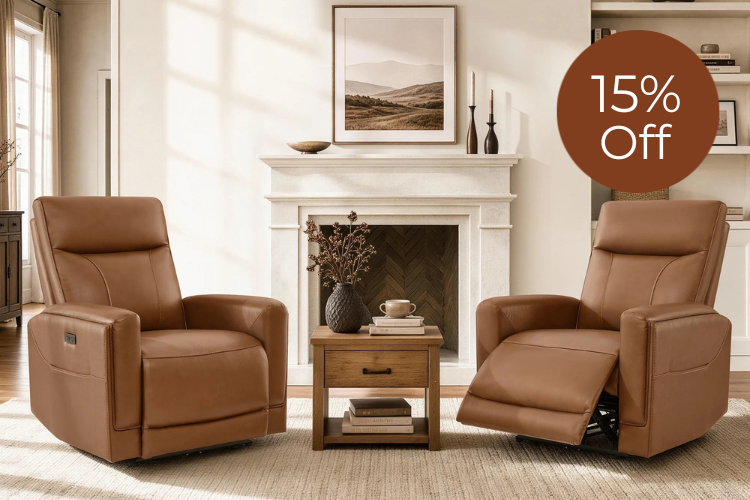
Our Myles Genuine Leather Swivel Glider Power Recliner combines 270-degree swivel with USB-C charging in a clean, modern frame. For smaller spaces, consider zero-wall options like the Isaac Zero Wall-hugger Power Recliner, which delivers full recline without requiring extra clearance.

How to Choose the Right Feature Set for Your Room
Use this radar chart to compare feature priorities across common scenarios.
Note on Methodology: These scores are heuristic ratings based on average consumer utility and spatial efficiency. They are intended as a guide for trade-offs (e.g., prioritizing space-saving vs. connectivity) rather than absolute technical measurements of specific models.
Feature Priority by Recliner Scenario
Heuristic scenario-fit comparison for choosing recliner feature sets.
View chart data
| Series | Small Room Fit | Large Room Fit | Frequent Charging | Light Charging | Viewing Flexibility | Swivel Utility | Zero-Wall Value | USB-C Value |
|---|---|---|---|---|---|---|---|---|
| Small room / heavy device user | 5.0 | 1.0 | 5.0 | 2.0 | 3.0 | 3.0 | 5.0 | 5.0 |
| Small room / light device user | 5.0 | 1.0 | 2.0 | 5.0 | 3.0 | 3.0 | 5.0 | 3.0 |
| Large room / heavy device user | 1.0 | 5.0 | 5.0 | 2.0 | 4.0 | 4.0 | 1.0 | 5.0 |
| Large room / light device user | 1.0 | 5.0 | 2.0 | 5.0 | 4.0 | 4.0 | 1.0 | 3.0 |
Focus first on core comfort and support, then layer on technology that directly solves your specific layout or usage needs. This approach helps avoid overpaying for features that sound impressive but see little daily use.
Our collection of swivel recliners offers multiple options that balance these hidden technologies with stylish, modern designs. Explore models like the Jaxon Genuine Leather Swivel Glider Power Recliner for advanced adjustability or the Leif Super Zero Gravity Power Leather Recliner for premium positioning features.
For more guidance, see our articles on Big Comfort, Small Footprint: The Best Power Recliners for Apartments or Recliners That Don't Look Like Recliners.
Frequently Asked Questions
Can a Recliner USB Port Charge a Laptop?
Most built-in USB ports are optimized for phones and tablets (typically 5V/2A). While USB-C ports with Power Delivery (PD) are becoming more common, they rarely provide the 60W+ required for sustained laptop charging. Use them for mobile devices and keep a wall outlet handy for laptops.
Is USB-C Better Than USB-A in a Recliner?
Yes. USB-C is the modern standard and is more likely to support faster charging protocols. It also future-proofs your furniture as USB-A is phased out of new electronics.
Do Swivel Recliners Work Well in Small Rooms?
They can, provided you have the "rotational clearance." A swivel chair needs a circular footprint of space to turn without hitting side tables. If space is extremely tight, a fixed-base "zero-wall" recliner is usually a safer bet.
Are Power Recliners With Tech Features Safe?
Yes, provided they carry recognized safety certifications (UL, ETL, or CE). To maintain safety, ensure the power cord is not positioned where the metal reclining "scissors" can pinch or cut the insulation.
How Much Extra Should I Pay for Hidden Tech Features?
Expect to pay a $100–$300 premium for integrated tech like USB-C and power headrests. The value is highest if these features replace other items (like a side table charging station or a bulky floor lamp).
Recommended Products




More to Read
 7 Sofa Trends That Actually Improve Comfort in 2026
Upgrade your living room with furniture that supports your body. Here are 7 modern sofa features designed to maximize your daily comfort...
7 Sofa Trends That Actually Improve Comfort in 2026
Upgrade your living room with furniture that supports your body. Here are 7 modern sofa features designed to maximize your daily comfort...
 Mother's Day Gift Guide: Cozy and Stylish Furniture Picks for Modern Moms
Make Mother's Day more meaningful with furniture gifts that bring comfort, smart features, storage, and quiet luxury into her everyday routine.
Mother's Day Gift Guide: Cozy and Stylish Furniture Picks for Modern Moms
Make Mother's Day more meaningful with furniture gifts that bring comfort, smart features, storage, and quiet luxury into her everyday routine.
 Performance Fabric Reality Check: Does It Really Repel Pet Hair and Stains?
Performance fabric is often marketed as a miracle solution for homes with pets and kids, but the reality is more nuanced. It...
Performance Fabric Reality Check: Does It Really Repel Pet Hair and Stains?
Performance fabric is often marketed as a miracle solution for homes with pets and kids, but the reality is more nuanced. It...