














































Best recliners for work-from-home breaks

The best recliners for work-from-home breaks help you switch out of work mode fast, then switch back without hassle. For most remote workers, that means choosing a chair for short recovery pauses, not a second desk chair. Micro-break research suggests even very brief pauses can help restore attention, which is why the right break seat can matter in a daily WFH routine.
Why a Break Recliner Is Different From an Office Chair
A recliner for work-from-home breaks solves a different problem than a desk chair. You are not trying to stay upright for hours of keyboard work. You are trying to reset for a few minutes, shift posture, and make the break feel real enough to help you come back focused.
That is where the practical value shows up. Studies on micro-breaks suggest that even pauses as brief as 40 seconds can help restore attention and improve task performance, and workplace guidance from Michigan State University on breaks during the workday points in the same general direction for well-being. A recliner cannot replace your main office chair, but it can make those breaks easier to take and easier to enjoy.
The key is to treat a recliner as a break seat, not a work seat. If the chair looks good in a home office, feels restorative for a short pause, and does not make the room feel overly casual, it is a better fit than a generic lounge chair. If you need one seat to do everything, that is usually where this category breaks down.
Features That Matter During a Midday Break
For a midday pause, the best features are the ones that reduce friction. Power recline helps you move from upright to resting mode without fiddling with a heavy lever. A power headrest can make reading, scrolling, or a short reset feel easier because you can fine-tune the angle instead of settling for one position.
Charging is a practical convenience, not a comfort miracle. If your phone often needs a top-off between calls, a recliner with charging ports can keep the break from turning into another desk task. Cup holders can be just as useful when you want a drink nearby without crowding your workstation.

Swivel and glide motion are more about flexibility than better posture. In a shared living room or hybrid office, they let the chair feel easier to live with because you can turn toward the desk, the TV, or the window without dragging the whole base. If you only want a simple rest seat, though, motion may be unnecessary clutter.
Space-saving fit is the other big filter. Wall-hugger or zero-wall styling generally helps when the chair has to live close to a wall or in a compact apartment office. The tradeoff is simple: the smaller the room, the more important it is to verify both the closed footprint and the fully reclined footprint before buying. If you want a deeper room-fit walkthrough, these wall-hugger layout tips are worth a look.
Here is the practical way to read the feature set: power control helps with quick resets, motion helps in shared rooms, and wall-hugger styling helps when square footage is tight. If a chair has all three, it can be a strong fit for a modern WFH space, but you still need to check whether the look suits the room.
Match the Chair to Your Break Style and Room Size
Use this simple fit guide to narrow the field before you compare product pages. The best choice depends on both your break habit and how much room the chair can take over when reclined.
WFH break recliner fit by scenario and room constraint
Use this as a quick fit guide: the best match depends on both how you break and how tight the room is. Choose the feature cluster that solves the space limit first, then the comfort need.
View chart data
| Scenario | Very tight room | Small room | Open corner |
|---|---|---|---|
| Quick reset | 3 | 2 | 1 |
| Reading break | 2 | 3 | 2 |
| Power nap | 1 | 2 | 3 |
For a quick stretch break in a very tight room, a wall-hugger style is usually the safest starting point. For a reading break in a small room, motion features and a power headrest can be more useful than extra bulk. For a longer nap-style pause in an open corner, a more premium recline posture often makes more sense because you have room for the chair to spread out.
CHITA Recliners Worth Shortlisting
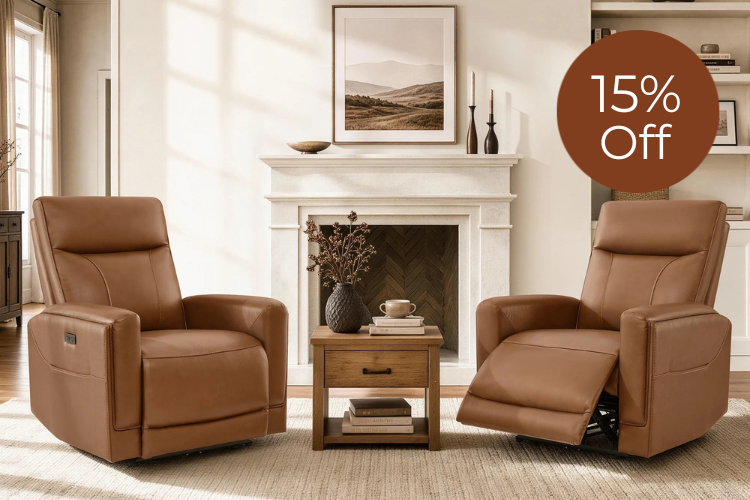
If you want a polished leather look and a strong case for short breaks, the Noah Zero-Gravity Genuine Leather Recliner with Power Headrest is the most obvious premium short-list pick. Its zero-gravity-style positioning should be read as a comfort posture, not a health claim, but it can make a short pause feel meaningfully more relaxed than an upright chair. The built-in charging and cup holders add convenience when you are trying to keep a break contained.
If you want movement and flexibility in a shared room, the Vinca Modern Power Swivel Glider Recliner with Power Lumbar & Headrest is the better fit. Swivel and glide features matter most when the chair has to work in more than one direction, and the power adjustment makes it easier to move from work mode to break mode without much effort. For buyers who care about a more active feel, that is often more useful than a static lounge-style chair.
For smaller offices, the Isaac Zero Wall hugger Power Recliner with Cup Holder is the most space-conscious option in the group. Zero-wall styling is helpful when you cannot give up much rear clearance, and the cup holder plus USB charging keep it practical for quick pauses. Because the detailed product fact pack is limited, it is best to treat this as a check-before-buying option for compact rooms rather than assuming every feature will suit every layout.
If you want a flexible middle-ground option, the Myles Genuine Leather Swivel Glider Power Recliner is worth a look. It combines swivel-glide motion with quiet power recline and USB-C charging, which makes it a practical fit for everyday break routines in a modern home office. That said, if your top priority is saving floor space, a wall-hugger design is still the safer choice.
A useful way to shortlist is this: choose Noah if you want the most premium rest posture, Vinca if motion matters in a shared room, Isaac if the room is tight, and Myles if you want a balanced style-and-function mix. For readers who want to browse more options, the latest recliners can help you compare the broader range after you have ruled out the wrong fit.
What to Check Before You Buy
- Measure the closed footprint and the fully reclined footprint. If either one crowds a walkway, desk, or cabinet, keep shopping.
- Confirm outlet placement and the cord path. A power recliner feels less convenient if the cable creates clutter in the same room where you work.
- Decide whether you want a quick reset seat, a reading chair, or a more lounge-like nap chair. That choice should drive the feature mix.
- Check upholstery and cleaning preferences. In a WFH space, the chair needs to look good often, not only when it is new.
- Compare the recliner profile to the room aesthetic. If it looks too casual for video calls or shared living space use, it may not be the right break chair.
A simple rule works well here: choose space-saving if the room is tight, choose motion if the chair lives in a shared area, and choose premium comfort if you actually take longer breaks. If you are unsure where to start, browse the wall-hugger range first, because fit problems are the hardest to fix after delivery.
Related Resources
- swivel recliner guidance
- Biohacking Your Rest: The 2026 Science of Zero Gravity for Sciatica and Edema Relief
- Decoding Upholstery Standards: The 2026 Guide to Performance Fabric Durability
FAQs About WFH Break Recliners
How Do I Know If a Recliner Will Fit My Home Office?
Measure the chair in both positions, not just upright. You need enough room for the closed footprint, the reclined footprint, and the walking path around it. If the chair will sit near a wall, wall-hugger styling is usually the first thing to check.
What Features Matter Most for a Short WFH Break?
Power recline and a headrest adjust the comfort level quickly, which is useful when the break is short. Charging ports and cup holders are helpful extras, especially if you want the pause to feel self-contained instead of turning into another task.
Can a Recliner Replace My Desk Chair?
Usually not for most buyers. A recliner is better as a break seat, while a desk chair is still the safer choice for long keyboard sessions, video calls, and focused work. Think of the recliner as a complement to your setup, not a replacement.
Why Does Wall-Hugger Design Matter in a Small Room?
It helps the chair work closer to a wall, which is a big deal in apartments and compact offices. That does not make the chair smaller in every direction, so you still need to check traffic flow and the reclined footprint before you order.
Can Swivel or Glide Motion Make Breaks Feel Better?
For some people, yes, because it makes the chair easier to turn and easier to use in a shared room. But motion is a preference feature, not a guaranteed comfort upgrade, so it is worth prioritizing only if you know you will use it.
Final Takeaway
The best recliners for work-from-home breaks are the ones that fit your room first and your break style second. If you need a compact, polished option, start with wall-hugger styling. If you want more movement, look at swivel or glide models. If your break is really about settling in, a premium recline posture can be worth it. Choose the seat that helps you reset fast, then get back to work without friction.
Recommended Products




More to Read
 7 Sofa Trends That Actually Improve Comfort in 2026
Upgrade your living room with furniture that supports your body. Here are 7 modern sofa features designed to maximize your daily comfort...
7 Sofa Trends That Actually Improve Comfort in 2026
Upgrade your living room with furniture that supports your body. Here are 7 modern sofa features designed to maximize your daily comfort...
 Mother's Day Gift Guide: Cozy and Stylish Furniture Picks for Modern Moms
Make Mother's Day more meaningful with furniture gifts that bring comfort, smart features, storage, and quiet luxury into her everyday routine.
Mother's Day Gift Guide: Cozy and Stylish Furniture Picks for Modern Moms
Make Mother's Day more meaningful with furniture gifts that bring comfort, smart features, storage, and quiet luxury into her everyday routine.
 Performance Fabric Reality Check: Does It Really Repel Pet Hair and Stains?
Performance fabric is often marketed as a miracle solution for homes with pets and kids, but the reality is more nuanced. It...
Performance Fabric Reality Check: Does It Really Repel Pet Hair and Stains?
Performance fabric is often marketed as a miracle solution for homes with pets and kids, but the reality is more nuanced. It...